
Mazda CX-5 Service & Repair Manual: Speaker Grille Removal/Installation
Center Speaker Grille
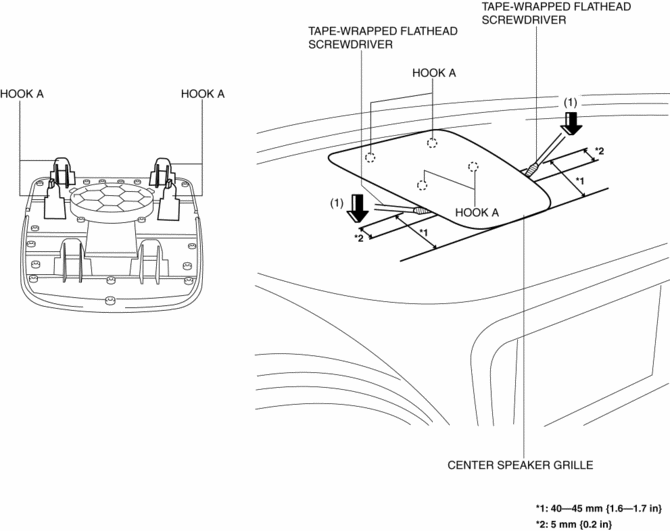
1. Insert a tape-wrapped flathead screwdriver into shown in the figure and remove hooks A in the direction of arrow (1).
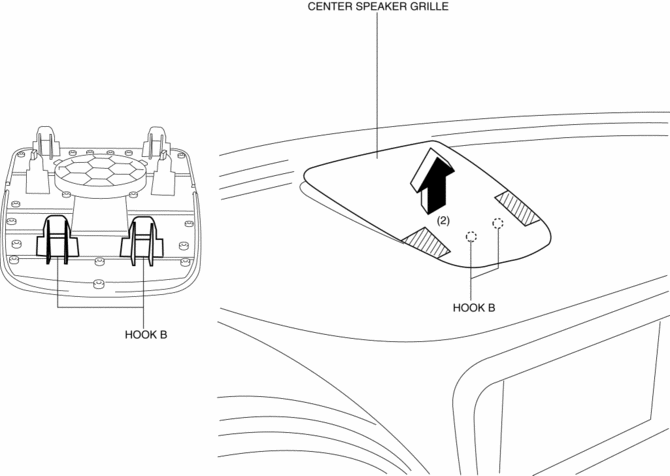
2. Take the shaded area shown in the figure, and remove the center speaker grille in the direction of arrow (2) while detaching hooks B.
3. Install in the reverse order of removal.
Side Speaker Grille
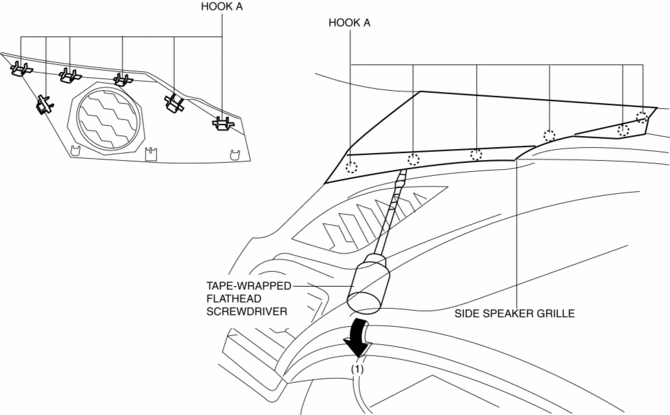
1. Insert a tape-wrapped flathead screwdriver into the service hole and remove hooks A in the direction of arrow (1).
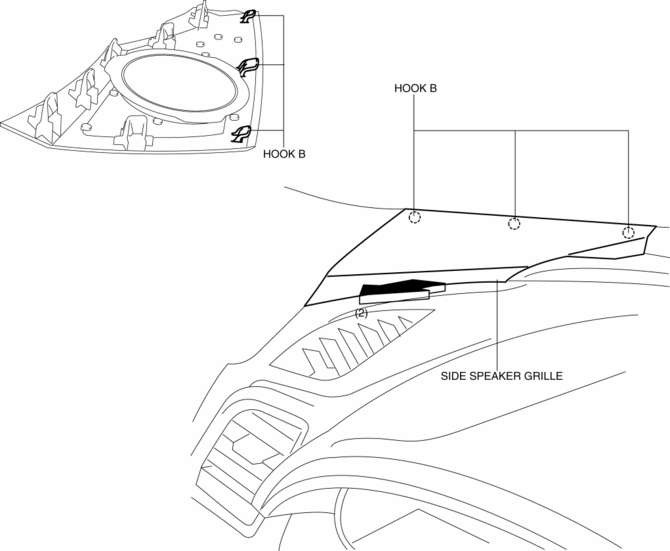
2. Pull the side speaker grille in the direction of the arrow (2), and remove the side speaker grille while detaching hooks B.
3. Install in the reverse order of removal.
 Sirius Satellite Radio Unit Removal/Installation
CAUTION:
The audio unit communicates with the SIRIUS satellite radio unit and records
the presence/non-presence of the SIRIUS satellite radio unit when the ignition
is switched to ACC or ...
 Speaker [With Bose®]
Purpose
Converts the audio signal from the audio unit to sound.
High quality sound is provided for the driver and passengers.
Function
Full-range speakers, which can output ...
Other materials:
Air Bag Module And Pre Tensioner Seat Belt Disposal Procedures [Standard Deployment
Control System]
WARNING:
A live (undeployed) air bag module or pre-tensioner seat belt may accidentally
operate (deploy) when it is disposed of and cause serious injury. Always refer
to the “AIR BAG MODULE AND PRE-TENSIONER SEAT BELT DEPLOYMENT PROCEDURES”
and dispose of air bag modules a ...
Tcs Off Switch, Tcs Off Indicator Light
Purpose/Function
The TCS OFF switch, located on the dashboard, allows for optionally enabling/disabling
the TCS control at driver discretion.
The TCS OFF indicator light, built into the instrument cluster, informs the
driver that TCS control has been disabled by operation ...
Windshield Wiper Motor Inspection
1. Disconnect the negative battery cable..
2. Remove the following parts:
a. Windshield wiper arm and blade.
b. Cowl grille.
Windshield Wiper Motor Inspection
1. Apply battery positive voltage and connect the ground to the windshield wiper
motor terminals as indicated in the table below a ...
