
Mazda CX-5 Service & Repair Manual: Climate Control Unit Removal/Installation [Full Auto Air Conditioner]
NOTE:
-
The climate control unit prior to replacement stores the vehicle specification information.
-
The new climate control unit does not store any vehicle specification information.
-
When the ignition is switched ON after the climate control unit is replaced, the climate control unit reads the vehicle specification information sent via CAN transmission from the instrument cluster, and stores the vehicle specification information.
1. Disconnect the negative battery cable..
2. Remove the following parts:
a. Decoration panel.
b. Shift lever knob (MTX).
c. Front console box.
d. Shift panel.
e. Upper panel.
f. Rear console.
g. Side wall.
h. Front console.
3. Remove in the order indicated in the table.
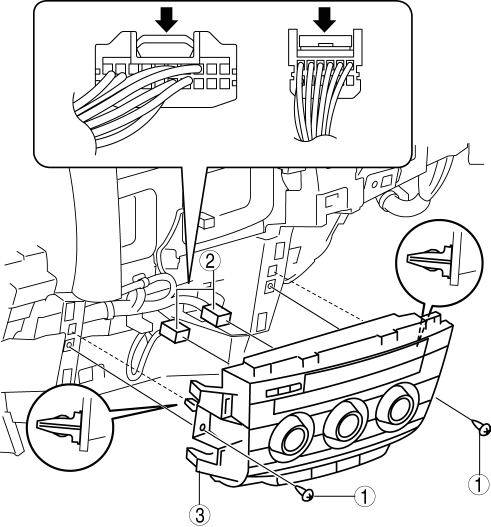
|
1 |
Screw |
|
2 |
Connector |
|
3 |
Climate control unit |
4. Install in the reverse order of removal.
5. Switch the ignition ON and perform the climate control unit automatic configuration.
6. Clear the DTCs..
 Climate Control Unit Inspection [Manual Air Conditioner]
1. Remove the climate control unit with the connector connected..
2. Switch the ignition ON (engine off or on).
3. Connect the negative (-) lead of the tester to the body ground.
4. By inserting ...
 Climate Control Unit Removal/Installation [Manual Air Conditioner]
Removal
1. Disconnect the negative battery cable..
2. Remove the following parts:
a. Shift lever knob (MTX).
b. Glove compartment.
c. Front console box.
d. Shift panel.
e. Upper panel.
...
Other materials:
Wheels And Tires
Outline
An adhesive-type balance weights has been adopted to the outer side of the
aluminum alloy wheels. Due to this, a stylish wheel design is realized.
In consideration of the environment, steel balance weights have been adopted
to reduce the use of lead in the vehicle.
...
Front Door Latch Switch
Purpose, Function
Switches on/off in conjunction with the latch lever rotation, and detects
the front door open/closed condition by the voltage which is changed by the
rear body control module (RBCM).
Construction
The switch is turned on/off by the rotation of the latch lev ...
Wheel Alignment Pre Inspection
1. Park the vehicle on level ground, in an unloaded condition*, with the wheels
straight forward.
*: Unloaded condition.....Fuel tank is full. Engine coolant and engine oil are
at specified level. Spare tire, jack and tools are in designated position.
2. Inspect the tire pressure.
...
