
Mazda CX-5 Service & Repair Manual: Power Steering Malfunction Indicator Light
Purpose
-
The power steering malfunction indicator light warns the driver that there is a malfunction with the electric power steering (EPS) system.
Function
-
If there is a malfunction in the EPS system, the power steering malfunction indicator light illuminates.
-
If the EPS system and CAN lines are normal, it illuminates when the ignition is switched ON (engine off), and turns off after the engine is started.
Construction
-
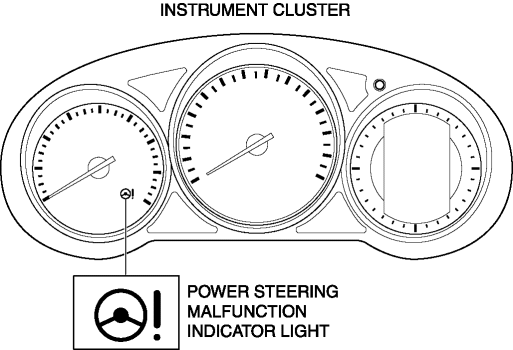
The power steering malfunction indicator light is built into the instrument cluster.
Operation
-
EPS system malfunction detection
-
If the EPS control module (CM) detects a system malfunction, it sends a power steering malfunction indicator light illumination on request signal to the instrument cluster via CAN.
-
The instrument cluster illuminates the power steering malfunction indicator light when it receives a power steering malfunction indicator light illumination on request signal.
-
Initial check
-
If the EPS system and CAN lines are normal, it illuminates when the ignition is switched ON (engine off), and turns off after the engine is started. If there is a system malfunction, the power steering malfunction indicator light illuminates.
Fail-safe
-
Function not equipped.
 Oil Control Valve (OCV) [Skyactiv G 2.0]
Purpose, Function
The OCV switches the oil passage to the hydraulic variable valve timing actuator
to control the opening/closing period of the exhaust valve.
Construction
The O ...
 Pressure Control Valve Inspection [Skyactiv G 2.0]
1. Remove the pressure control valve assembly..
CAUTION:
Do not apply a pressure 36 kPa {0.37 kgf/cm2, 5.2 psi} or more. Doing so
will damage the pressure control valve and evaporative ho ...
Other materials:
Side Air Bag Module Removal/Installation [Standard Deployment Control System]
WARNING:
Handling the air bag module improperly can accidentally operate (deploy)
the air bag module, which may seriously injure you. Read the air bag system
service warnings and cautions before handling the air bag module..
If the side air bag module is installed with debris i ...
Relay And Fuse Block
Purpose
Relays and fuses used by each system are grouped and housed together for
smooth inspection and replacement servicing.
Function
Relays and fuses used by each system are grouped and housed together.
Construction
Installed in the engine compartment.
...
Engine Coolant Temperature (ECT) Sensor Removal/Installation
WARNING:
When the engine is hot, it can badly burn. Turn off the engine and wait until
it is cool before removing the ECT sensor.
ECT Sensor No.1
1. Disconnect the negative battery cable..
2. Remove the plug hole plate..
3. Drain the engine coolant..
4. Pull out the evaporati ...
