
Mazda CX-5 Service & Repair Manual: Oil Control Valve (OCV) [Skyactiv G 2.0]
Purpose, Function
-
The OCV switches the oil passage to the hydraulic variable valve timing actuator to control the opening/closing period of the exhaust valve.
Construction
-
The OCV is installed to the exhaust camshaft cap (No.1).
-
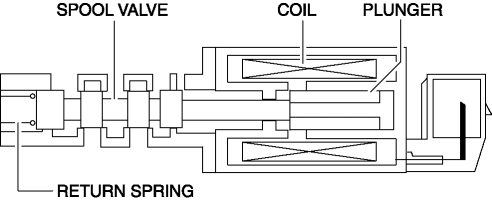
The OCV consists of a spool valve which switches the engine oil passage and a plunger, coil, and return spring which operate the spool valve.
Operation
At retard
-
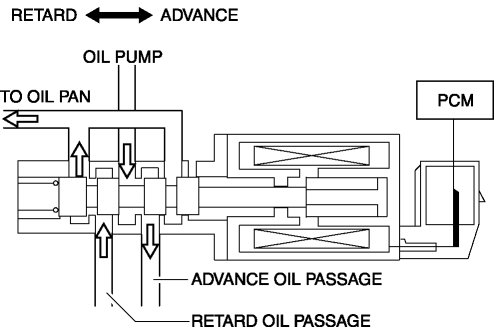
The spool valve is moved to the retard side by the signal from the PCM and engine oil is lead to the retard oil passage of the exhaust camshaft.
At advance
-
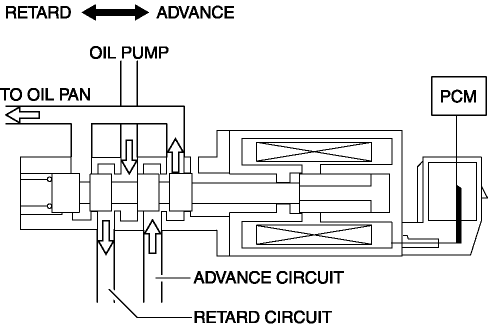
The spool valve is moved to the advance side by the signal from the PCM and engine oil is lead to the advance oil passage of the exhaust camshaft.
Middle point maintenance
-
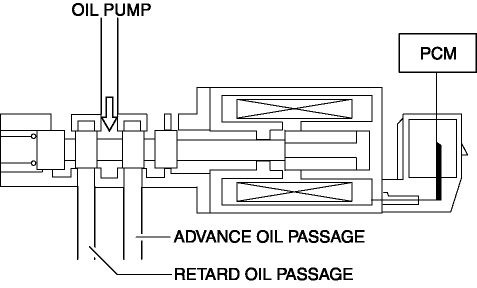
The spool valve is moved to the closed position of the oil passage to the exhaust camshaft by the signal from the PCM.
-
The construction is designed to supply a small amount of oil to the advance oil passage even while the middle point is maintained, improving holding stability while at low oil pressure.
Fail-safe
|
DTC |
Fail-safe |
|
P0014:00 |
|
|
P0015:00 |
|
|
P2090:00 |
|
|
P2091:00 |
|
 Oil Control Valve (OCV) Removal/Installation [Skyactiv G 2.0]
WARNING:
A hot engine can cause severe burns. Turn off the engine and wait until it
is cool before servicing.
1. Disconnect the negative battery cable..
2. Remove the plug hole plat ...
 Power Steering Malfunction Indicator Light
Purpose
The power steering malfunction indicator light warns the driver that there
is a malfunction with the electric power steering (EPS) system.
Function
If there is a malfunc ...
Other materials:
Camshaft Position (CMP) Sensor Inspection
Intake CMP Sensor
Visual inspection
CAUTION:
When replacing the CMP sensor, make sure there is no foreign material on
it such as metal shavings. If it is installed with foreign material, the sensor
output signal will malfunction resulting from fluctuation in magnetic flux and
caus ...
Hydraulic Pressure Control System Outline [Fw6 A EL, Fw6 Ax EL]
Outline
The hydraulic control mechanism consists of an oil cooler which maintains
the hydraulic pressure at the optimum temperature, a control valve body and
each shift valve which perform adjustment and circuit switching of the hydraulic
pressure based on the control content calcula ...
Power Window System Preliminary Inspection [Power Window System]
Manual Open/Close Function Inspection
STEP
INSPECTION
ACTION
1
Switch the ignition ON (engine off or on).
Operate the power window using the manual open/close function on
the power window main swit ...
