
Mazda CX-5 Service & Repair Manual: Auto Dimming Mirror
Purpose
-
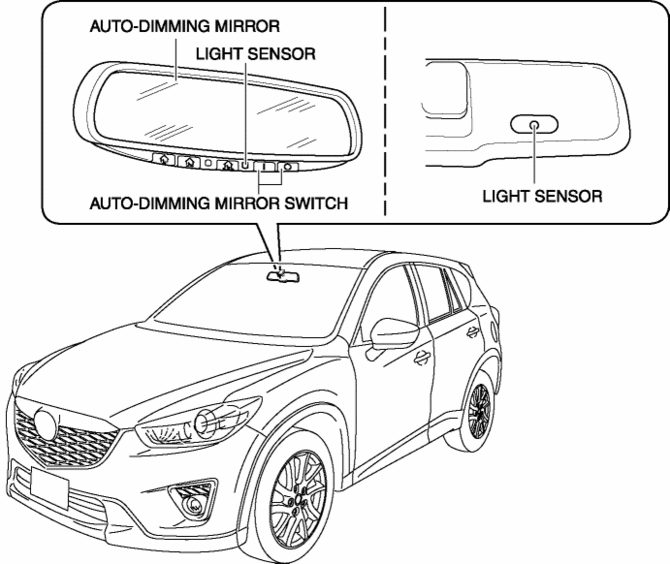
The automatic glare prevention rearview mirror prevents the driver from being affected by light from vehicles at the rear.
Structural view
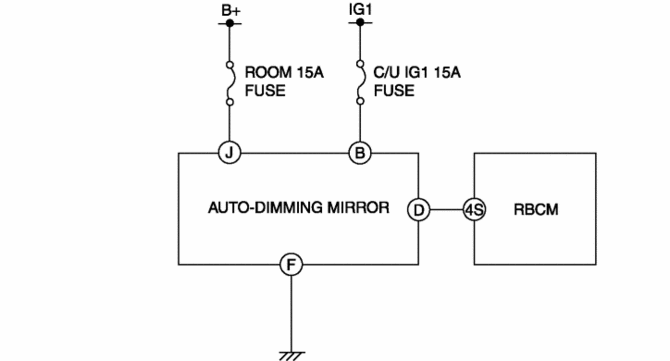
System wiring diagram
Function
-
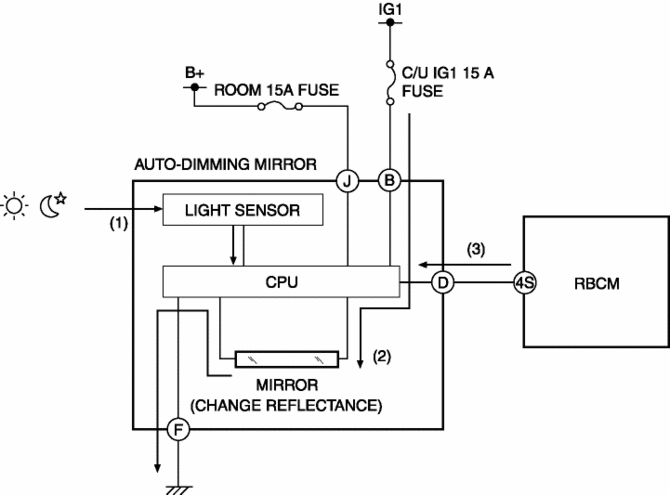
The automatic glare prevention rearview mirror detects the level of the surrounding light and glare from vehicles at the rear using the light sensor.
-
The automatic glare prevention rearview mirror combines the level of the surrounding light and the glare from vehicles at the rear and changes the reflection rate of the mirror between 10% and 70%.
-
When the automatic glare prevention rearview mirror receives a reverse signal from the rear body control module (RBCM), the reflection rate of the mirror is fixed at 70% or more.
Operation
-
When the automatic glare prevention rearview mirror switch is turned on, the mirror switches to automatic glare prevention mode.
-
While in automatic glare prevention mode, the light sensor detects the level of surrounding light and the glare from vehicles at the rear.(1)
-
The automatic glare prevention rearview mirror changes the voltage applied to the mirror according to the level of the surrounding light and the glare from vehicles at the rear.(2)
-
The mirror changes the reflection rate between 10% and 70% according to the voltage that is applied.
-
However, if it receives a reverse signal from the rear body control module (RBCM) (3), the reflection rate of the mirror is fixed at 70% or more.
Fail-safe
-
Function not equipped
 Mirrors
...
 Auto Dimming Mirror Inspection
1. Measure the voltage at each terminal.
If the voltage is not as specified in the Terminal Voltage Table (Reference),
inspect the parts under “Inspection item (s)” and related wiring h ...
Other materials:
Rain Sensor
Outline
The rain sensor detects the amount of rainfall and calculates the wiper operation
speed, and outputs a windshield wiper control signal to the front body control
module (FBCM) to perform automatic wiper operation (auto wiper system) according
to the amount of rainfall.
...
Liftgate
WARNING
Never allow a person to ride in the luggage compartment:
Allowing a person to ride in the luggage compartment is dangerous.
The person in the luggage compartment could be seriously injured or killed during
sudden braking or a collision.
Do not drive with the liftgate open:
Exhaust gas ...
Front Body Control Module (Fbcm) Inspection
1. Remove the fuse box cover..
2. Remove the front body control module (FBCM) from the fuse box..
3. Verify that the voltages of each of the terminals are as indicated in the
Terminal Voltage Table (Reference).
If the voltage is not as indicated in the table, inspect the parts under
...
