
Mazda CX-5 Service & Repair Manual: Wheel Apron Component Removal [Panel Replacement]
Symbol Mark

Removal Procedure
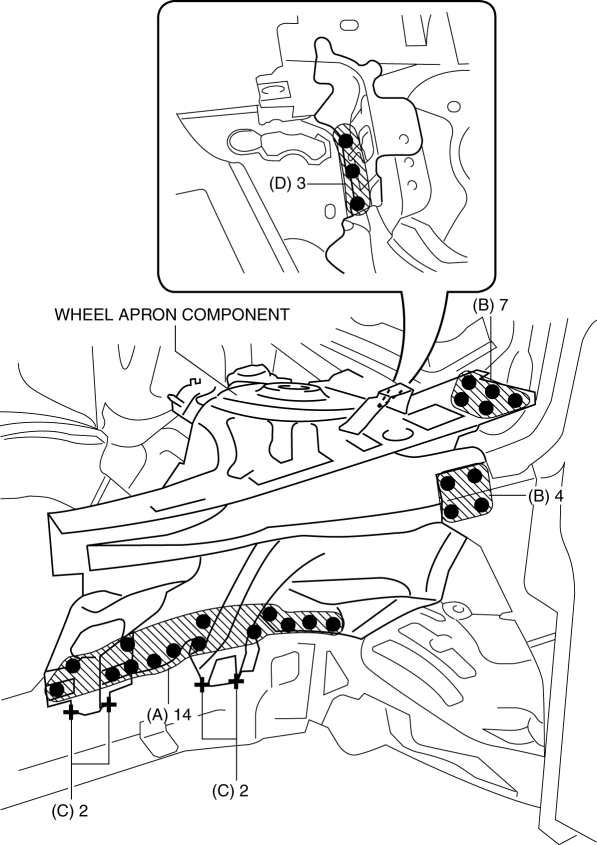
1. Drill the 14 locations indicated by (A) from the front wheel housing side shown in the figure.
2. Drill the 11 locations indicated by (B) shown in the figure.
3. Drill the 4 locations indicated by (C) shown in the figure.
NOTE:
-
When drilling the 14 locations indicated by (A) and 4 locations indicated by (C) shown in the figure, do not drill a hole all the way through or there could be a problem when installing the new part.
4. Drill the 3 locations indicated by (D) shown in the figure.
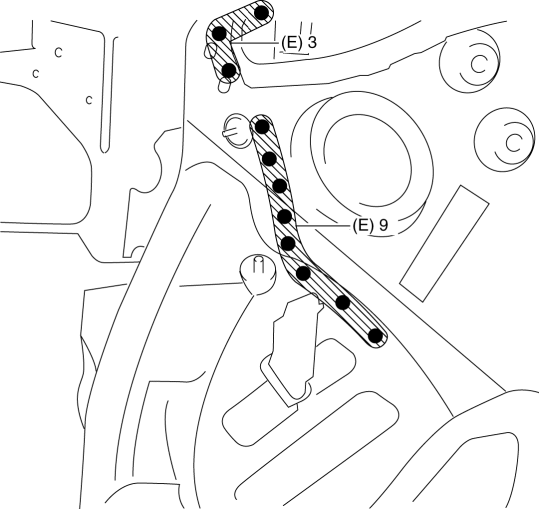
5. Drill the 12 locations indicated by (E) from the inside shown in the figure.
6. Remove the wheel apron component.
 Wheel Apron Component Installation [Panel Replacement]
Symbol Mark
Installation Procedure
1. When installing new parts, measure and adjust the body as necessary to conform
with standard dimensions.
2. Drill holes for the plug welding before inst ...
 Wheel Balance Adjustment (Aluminum Alloy Wheel)
CAUTION:
Adjust the outer wheel balance first, then the inner wheel balance.
Be careful not to scratch the wheels.
Adhesive-type Balance Weight (Outer)
1. Remove the old bal ...
Other materials:
Propeller Shaft Removal/Installation
CAUTION:
If the constant velocity joint is bent during propeller shaft removal/installation
or transportation after servicing, the constant velocity joint boot may contact
the metallic cover and the boot may be damaged. Insert a rag between the boot
and the metallic cover before ser ...
Blower Unit Removal/Installation
1. Disconnect the negative battery cable..
2. Remove the following parts:
a. Front scuff plate (passenger-side).
b. Front side trim (passenger-side).
c. Dashboard under cover.
d. Glove compartment.
e. Decoration panel.
f. Lower panel (passenger-side).
3. Disconnect the blower motor c ...
Active Command Modes Inspection [Rear Body Control Module (Rbcm)]
1. Connect the M-MDS to the DLC-2.
2. After the vehicle is identified, select the following items from the initialization
screen of the M-MDS.
a. Select “DataLogger”.
b. Select “Modules”.
c. Select “R_BCM”.
3. Select the simulation items from the PID table.
4. Perform the a ...
