
Mazda CX-5 Service & Repair Manual: Antenna Feeder No.3 Inspection
1. Disconnect the negative battery cable..
2. Remove the following parts:
a. Front scuff plate.
b. Rear scuff plate.
c. B-pillar lower trim.
d. Front seat belt adjusting cover.
e. Front seat belt upper anchor installation bolt.
f. B-pillar upper trim.
g. Rear seat cushion.
h. Trunk side upper trim.
i. D-pillar trim.
j. C-pillar trim.
3. Remove the rear passenger's assist handle..
4. Partially peel back the headliner.
NOTE:
-
If the headliner is peeled back excessively, the headliner could become creased. Be careful not to peel back the headliner excessively.
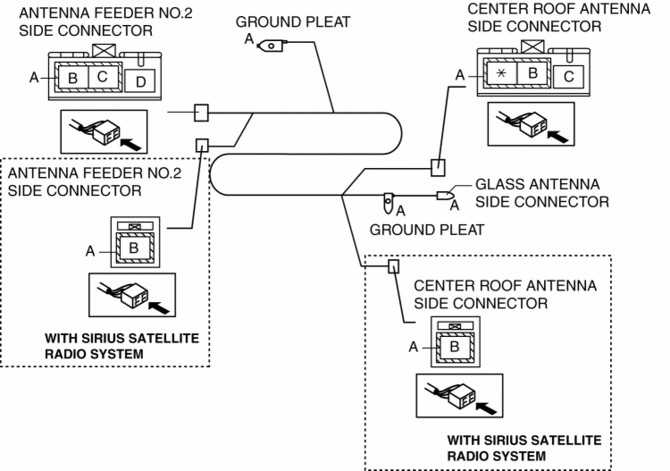
5. Disconnect antenna feeder No.2.
6. Disconnect the roof antenna connector.
7. Disconnect the glass antenna.
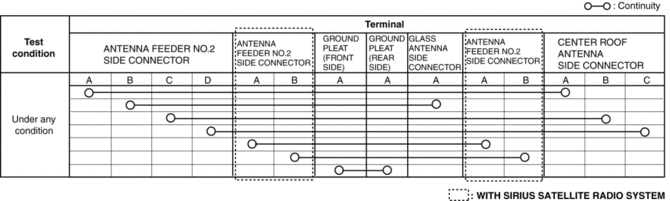
8. Verify that the continuity between antenna feeder No.3 terminals is as indicated in the table.
-
If not as indicated in the table, replace antenna feeder No.3.
 Antenna Feeder No.2 Removal/Installation
Removal
1. Disconnect the negative battery cable..
2. Remove the following parts:
a. Sunroof seaming welt (with sunroof system).
b. A-pillar trim.
c. Front map light.
d. Sunvisor.
e. Fron ...
 Antenna Feeder No.3 Removal/Installation
1. Disconnect the negative battery cable..
2. Remove the following parts:
a. B-pillar lower trim.
b. Front seat belt adjusting cover.
c. Front seat belt upper anchor installation bolt.
d. B- ...
Other materials:
Low And Reverse Brake [Fw6 A EL, Fw6 Ax EL]
Purpose/Function
The low and reverse brake stops the rotation of the front internal gear and
rear planetary carrier while in 1GR and in reverse, locking them to the transaxle
case.
Construction
The low and reverse brake consist of the following parts shown in the figure.
...
Main Fuse
Purpose
If electric current of the specified value or more flows to each fuse, the
fuse melts due to heat generation to protect the systems and parts downstream
of the fuse.
Function
If electric current to each fuse is the specified value or more, the fuse
melts due to h ...
Master Cylinder Removal/Installation
1. Remove the battery..
2. Remove in the order indicated in the table.
3. Install in the reverse order of removal.
4. After installation, add brake fluid, bleed the air, and inspect for fluid
leakage..
1
Brake fluid level sensor connector
2
...
