
Mazda CX-5 Service & Repair Manual: Antenna Feeder No.2 Removal/Installation
Removal
1. Disconnect the negative battery cable..
2. Remove the following parts:
a. Sunroof seaming welt (with sunroof system).
b. A-pillar trim.
c. Front map light.
d. Sunvisor.
e. Front scuff plate.
f. Rear scuff plate.
g. B-pillar lower trim.
h. Adjust anchor cover.
i. Upper anchor installation bolt on the seat belt.
j. B-pillar upper trim.
k. Assist handle.
l. Trunk board.
m. Trunk end trim.
n. Trunk side trim.
o. D-pillar trim.
p. C-pillar trim.
q. Headliner.
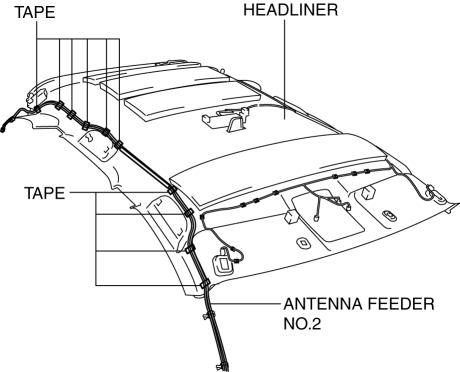
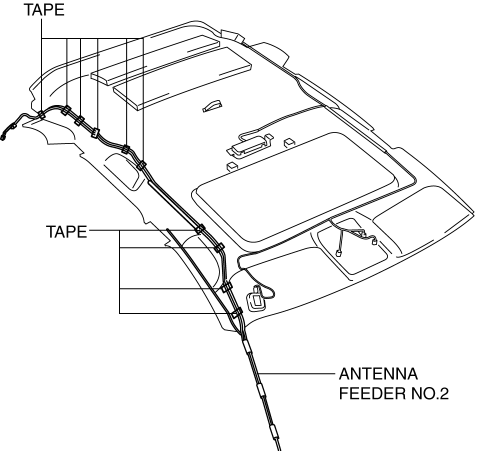
3. Peel off the tape shown in the figure and remove antenna feeder No.2.
Without sunroof
With sunroof
Installation
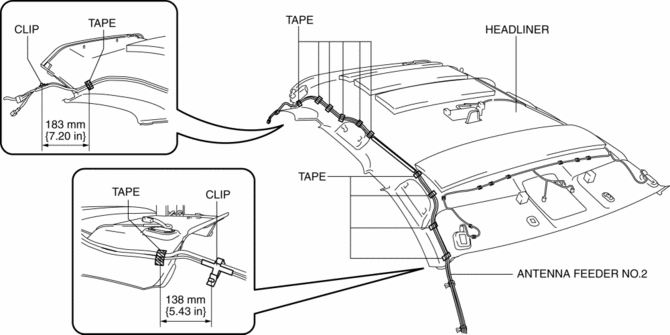
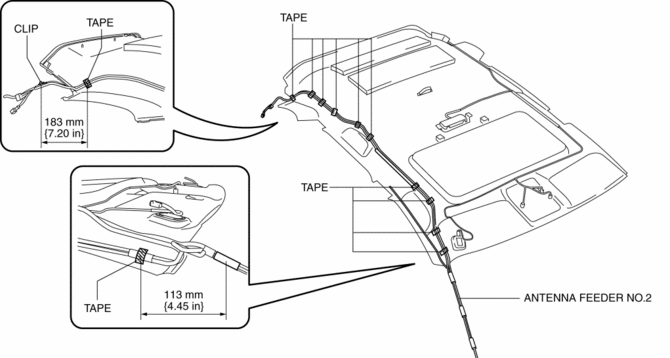
1. Affix tape shown in the figure and install antenna feeder No.2.
Without sunroof
With sunroof
2. Install the following parts:
a. C-pillar trim.
b. D-pillar trim.
c. Trunk side trim.
d. Trunk end trim.
e. Trunk board.
f. Assist handle.
g. B-pillar upper trim.
h. Upper anchor installation bolt on the seat belt.
i. Adjust anchor cover.
j. B-pillar lower trim.
k. Rear scuff plate.
l. Front scuff plate.
m. Sunvisor.
n. Front map light.
o. A-pillar trim.
p. Sunroof seaming welt (with sunroof system).
3. Connect the negative battery cable..
 Antenna Feeder No.2 Inspection
1. Disconnect the negative battery cable..
2. Remove the following parts:
a. A-pillar trim (RH).
b. Trunk board.
c. Trunk end trim (RH).
d. Rear scuff plate (RH).
e. Trunk side trim (RH). ...
 Antenna Feeder No.3 Inspection
1. Disconnect the negative battery cable..
2. Remove the following parts:
a. Front scuff plate.
b. Rear scuff plate.
c. B-pillar lower trim.
d. Front seat belt adjusting cover.
e. Front se ...
Other materials:
Charging System Warning Light [Skyactiv G 2.0]
Purpose, Function
Warns the driver of a charging system malfunction.
Construction
The charging system warning light is built into the instrument cluster..
Operation
Illuminates when a malfunction occurs in the charging system and DTCs is
stored in the PCM.
...
Starter Disassembly/Assembly [Skyactiv G 2.0]
1. Disassemble in the order indicated in the table.
2. Assemble in the reverse order of disassembly.
1
Magnetic switch
2
Adjustment washer
3
Rear housing
4
Brush and brush holder
...
Map Light Inspection
Front Map Light
1. Disconnect the negative battery cable..
2. Remove the front map light..
3. Verify that the continuity between the front map light terminals is as indicated
in the table.
If not as indicated in the table, replace the front map light or front map
light bulb ...
