
Mazda CX-5 Service & Repair Manual: Wheel Apron Component Installation [Panel Replacement]
Symbol Mark

Installation Procedure
1. When installing new parts, measure and adjust the body as necessary to conform with standard dimensions.
2. Drill holes for the plug welding before installing the new parts.
3. After temporarily installing new parts, make sure the related parts fit properly.
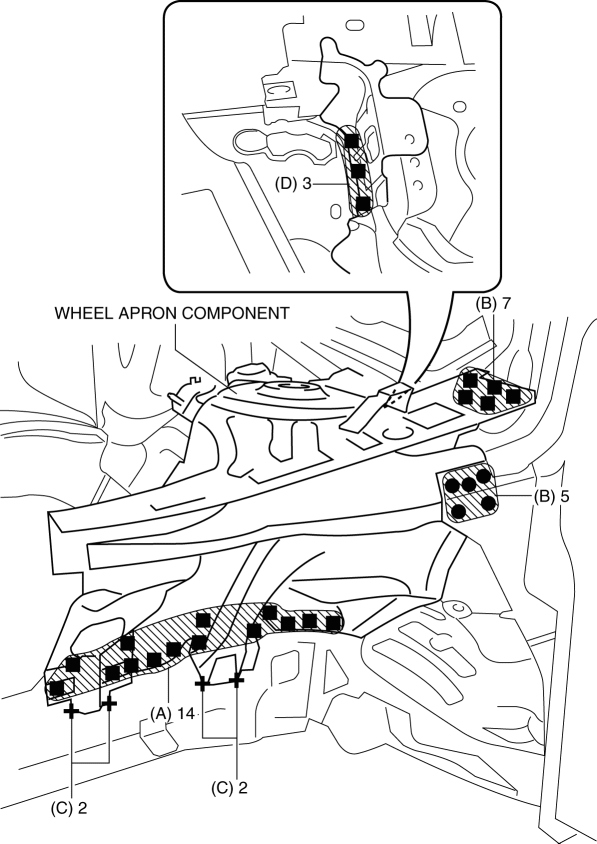
4. Plug weld the 14 locations indicated by (A) from the front wheel housing side shown in the figure.
5. Spot weld the 5 locations indicated by (B) shown in the figure.
6. Arc weld the 4 locations indicated by (C) shown in the figure.
7. Plug weld the 3 locations indicated by (D) shown in the figure.
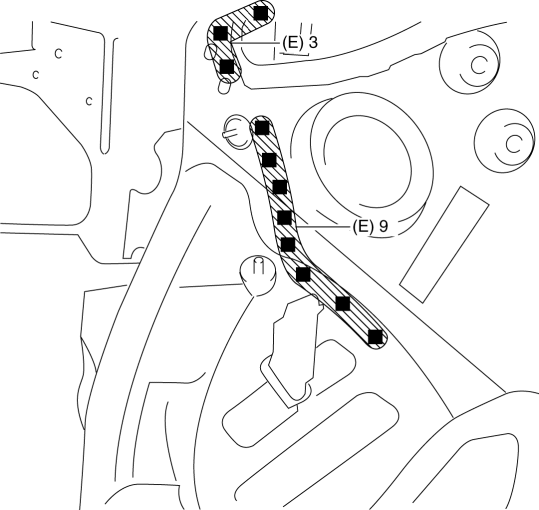
8. Plug weld the 12 locations indicated by (E) from the inside shown in the figure, then install the wheel apron component.
 Wheel Alignment Pre Inspection
1. Park the vehicle on level ground, in an unloaded condition*, with the wheels
straight forward.
*: Unloaded condition.....Fuel tank is full. Engine coolant and engine oil are
at specified leve ...
 Wheel Apron Component Removal [Panel Replacement]
Symbol Mark
Removal Procedure
1. Drill the 14 locations indicated by (A) from the front wheel housing side
shown in the figure.
2. Drill the 11 locations indicated by (B) shown in the figure ...
Other materials:
Engine Coolant Temperature (ECT) Sensor
Purpose/Function
Detects the ECT as basic information for mainly determining the fuel injection
amount.
Detects the ECT and inputs it to the PCM as an ECT signal.
The ECT sensor No.2 is only used for OBD.
Construction
ECT sensor No.1
Installed to the water out ...
Mirror Base Removal
1. Disconnect the negative battery cable..
2. Remove the rearview mirror. (without auto-dimming mirror).
3. Remove the auto-dimming mirror. (with auto-dimming mirror).
4. Wind each end of a wire around a bar.
WARNING:
Using the piano wire with bare hands can cause injury. Always ...
Oil Pump [Fw6 A EL, Fw6 Ax EL]
Purpose/Function
The oil pump generates hydraulic pressure in the oil line of the automatic
transaxle together with supplying lubrication to powertrain related parts.
Construction
The oil pump has adopted a gear type with built-in outer and inner rotors.
The inner roto ...
