
Mazda CX-5 Service & Repair Manual: General Procedures (Front And Rear Axles)
Wheel and Tire Installation
1. When installing the wheels and tires, tighten the wheel nuts in a criss-cross pattern to the following tightening torque.
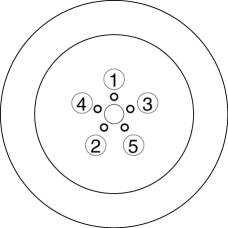
-
Tightening torque
-
108—147 N·m {12—14 kgf·m, 80—108 ft·lbf}
Suspension Links Removal/Installation
1. For the joint sections with rubber bushings, raise the vehicle using a lift, and then temporarily tighten the installation bolts and nuts. Lower the vehicle to the ground and tighten them to the specified tightening torque.
Connector Disconnection
1. Disconnect the negative battery cable before performing any work that requires handling of connectors..
Headlight Auto Leveling System Initialization (Vehicle with discharge headlight system)
1. Initialize the auto leveling sensor, when performing the following services.
-
Removing the auto leveling sensor
-
Disconnecting the auto leveling sensor link
-
Removing the suspension parts related the vehicle height
Electronic AWD Control System Parts
1. After servicing the electronic AWD control system parts, verify that no DTC has been stored. Clear any DTCs remaining in the memory.
 Driveline/Axle SST
Front and Rear Axle
49 T028 3A0
Ball joint puller set
49 T028 301
Dust boot installer
49 U034 204
Dust boot installer
...
 4WD
4WD
...
Other materials:
Customer Assistance (Mexico)
Your complete and permanent satisfaction is our business. We are here to serve
you. All Authorized Mazda Dealers have the knowledge and the tools to keep your
Mazda vehicle in top condition.
If you have any questions or recommendations for improvement regarding the service
of your Mazda vehic ...
Air Mix Actuator Removal/Installation [Full Auto Air Conditioner]
Driver-side
1. Disconnect the negative battery cable..
2. Remove the following parts:
a. Side wall (driver-side).
b. Front heat duct (LH).
3. Disconnect the air mix actuator connector.
4. Remove the screw.
5. Remove the driver-side air mix actuator.
6. Install in the reverse order ...
Oil Seal (Side Gear) Replacement
1. Remove the drain plug and the drain differential oil into a container.
2. Install a new washer and the drain plug, and tighten.
3. Remove the rear drive shaft..
4. Remove the clip from the drive shaft.
CAUTION:
Wrap the end of a screwdriver with cloth to prevent scratches to the i ...
