
Mazda CX-5 Service & Repair Manual: Sirius Satellite Radio Unit
Purpose
-
Satellite radio programming can be listened to.
Function
-
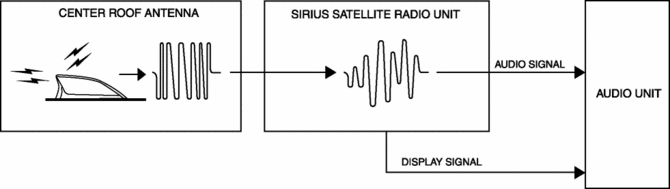
The voltage signal sent from the center roof antenna (SIRIUS satellite radio antenna) is output to the audio unit.
Construction
-
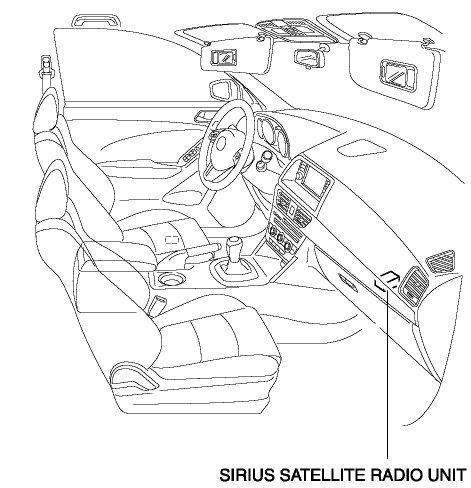
The SIRIUS satellite radio unit is installed to the interior of the glove compartment.
-
Consists of a bracket for securing to the dashboard member, and a tuner.
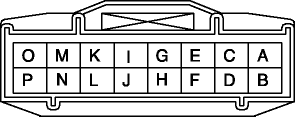
Terminal layout and signal
|
Terminal |
Signal |
|
|
|
A |
Power ground |
|
B |
— |
|
|
C |
Output RH (+) |
|
|
D |
— |
|
|
E |
Output LH (+) |
|
|
F |
— |
|
|
G |
Signal ground |
|
|
H |
— |
|
|
I |
— |
|
|
J |
— |
|
|
K |
CAN_L |
|
|
L |
CAN_H |
|
|
M |
— |
|
|
N |
— |
|
|
O |
ACC |
|
|
P |
B+ |
|
Operation
1. The SIRIUS satellite radio unit detects the radio station selected by the user from the electric signal sent from center roof antenna (SIRIUS satellite radio antenna).
2. The detected radio broadcast audio signal and the video signal are sent to the audio unit.
3. The audio unit outputs the audio and video signals received from the SIRIUS satellite radio unit.
Fail-safe
-
Function not equipped.
 Rear Mount Camera Removal/Installation
CAUTION:
The audio unit communicates with the rear mount camera and records the presence/non-presence
of the rear mount camera when the ignition is switched to ACC or ON (engine
off or o ...
 Sirius Satellite Radio Unit Removal/Installation
CAUTION:
The audio unit communicates with the SIRIUS satellite radio unit and records
the presence/non-presence of the SIRIUS satellite radio unit when the ignition
is switched to ACC or ...
Other materials:
Front Door Speaker Removal/Installation
Without Bose®
NOTE:
If the procedure is performed while holding the front door speaker cone,
it could deform the cone causing a malfunction. Therefore, perform the procedure
while holding any part other than the cone.
1. Disconnect the negative battery cable..
2. Remove the f ...
Active Command Modes Inspection [Rear Body Control Module (Rbcm)]
1. Connect the M-MDS to the DLC-2.
2. After the vehicle is identified, select the following items from the initialization
screen of the M-MDS.
a. Select “DataLogger”.
b. Select “Modules”.
c. Select “R_BCM”.
3. Select the simulation items from the PID table.
4. Perform the a ...
Awd Warning Light
Purpose, Function
Warns the driver of a AWD system malfunction.
Construction
The AWD warning light is built into the instrument cluster.
Operation
If the self-diagnostic function stores a DTC, the warning light illuminates
to alert the driver of the malfunct ...
