
Mazda CX-5 Service & Repair Manual: Relay And Fuse Block Middle Cover Disassembly/Assembly
1. Insert a tape-wrapped flathead screwdriver into the service hole in the position shown in the figure.
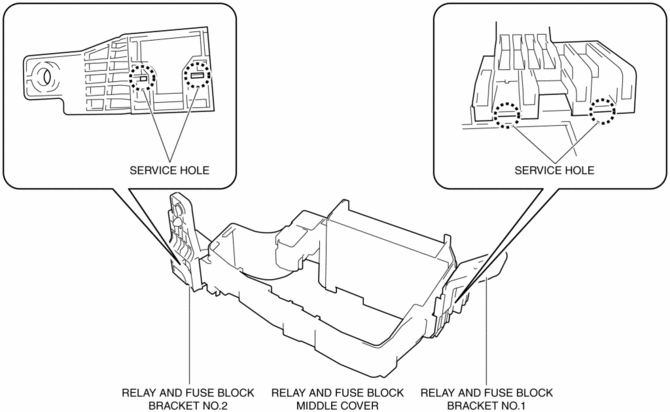
2. While pressing the relay and fuse block middle cover tab in the direction of arrow (1) shown in the figure, pull out the bracket in the direction of arrow (2) to detach the relay and fuse block middle cover tab from the bracket.
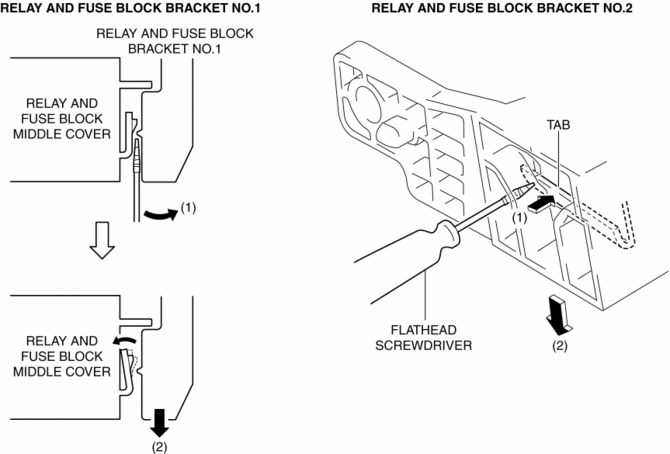
3. Detach all the relay and fuse block middle cover tabs from the bracket and remove the bracket from the relay and fuse block middle cover.
4. Assemble in the reverse order of disassembly.
 Relay And Fuse Block Disassembly/Assembly
1. Insert a tape-wrapped flathead screwdriver into the service hole in the position
shown in the figure.
2. Move the flathead screwdriver in the direction of the arrow (1) shown in the
figur ...
 Relay And Fuse Block Removal/Installation
1. Remove the battery tray..
2. Remove the air cleaner case..
3. While pressing the relay and fuse block upper cover tab in the direction of
the arrow (1) shown in the figure, lift up the relay ...
Other materials:
Light Bulbs
WARNING
Do not replace the xenon fusion bulbs yourself:
Replacing the xenon fusion bulbs yourself is dangerous. Because the xenon fusion
bulbs require high voltage, you could receive an electric shock if the bulbs are
handled incorrectly. Consult an Authorized Mazda Dealer when the replaceme ...
Electronic Control Coupling
Purpose, Function
An electromagnetic clutch, which operates smoothly due to the lack influence
from the front and rear wheel traction force, has been adopted for the electronic
control coupling system.
Construction
The construction of the coupling enables the torque formed ...
Rear Body Control Module (Rbcm) Configuration (Using Read/Write Function)
NOTE:
When performing configuration, it is necessary to read the vehicle specification
information from the rear body control module (RBCM) before replacing it. Connect
the M-MDS to the vehicle and perform vehicle identification before removing
the rear body control module (RBCM). T ...
