
Mazda CX-5 Service & Repair Manual: Rear Sash Molding Removal
WARNING:
-
Using a utility knife with bare hands can cause injury. Always wear gloves when using a utility knife.
1. Remove the rear door garnish. (rear side).
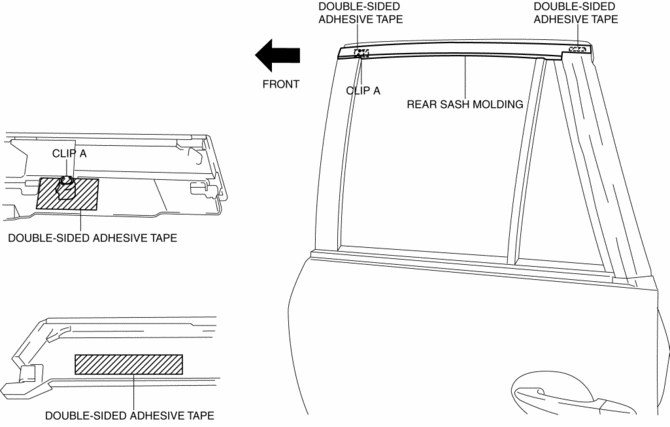
2. Remove the double-sided adhesive tape in the position shown in the figure using the utility knife.
CAUTION:
-
When remove the double-sided adhesive tape, be careful not to damage clip A.
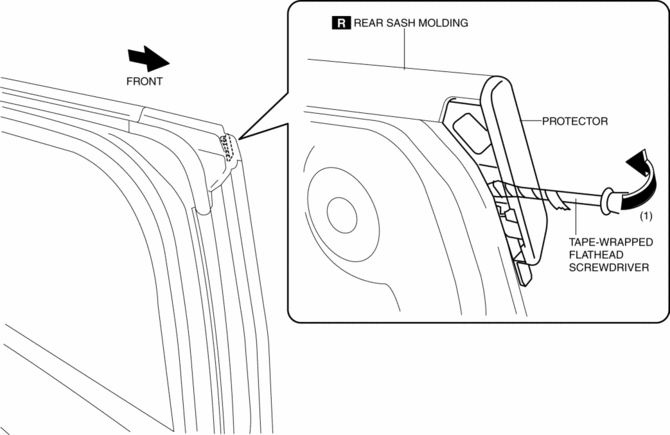
3. Insert a tape-wrapped flathead screwdriver shown in the figure and remove the protector in the direction of arrow (1).
4. Insert a tape-wrapped flathead screwdriver shown in the figure and remove clips A in the direction of arrow (2).
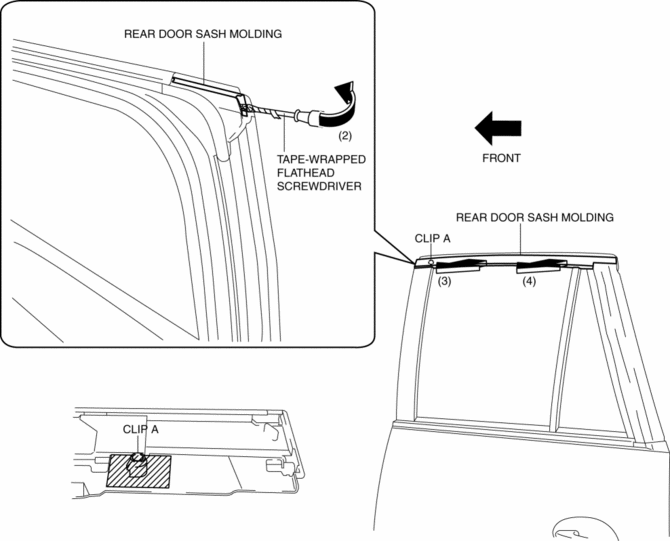
5. Remove the rear sash molding in the direction of arrow in the order of (3), (4) shown in the figure.
 Rear Sash Molding Installation
WARNING:
Using a utility knife with bare hands can cause injury. Always wear gloves
when using a utility knife.
NOTE:
Double-sided adhesive tape has already been attached to t ...
 Rear Side Panel Installation [Panel Replacement]
Symbol Mark
Installation Procedure
1. When installing new parts, measure and adjust the body as necessary to conform
with standard dimensions.
2. Drill holes for the plug welding before inst ...
Other materials:
Power Window Main Switch Removal/Installation
1. Disconnect the negative battery cable..
2. Remove the cover A.
3. Insert a tape-wrapped fastener remover shown in the figure and remove the
tab B in the direction of arrow (1).
4. Slide the power window main switch cover in the direction of the arrow (2)
shown in the figure and ...
Pressure Sensor Removal/Installation [Two Step Deployment Control System]
WARNING:
Handling the pressure sensor improperly can accidentally operate (deploy)
the air bag module, which may seriously injure you. Read the air bag system
service warnings and cautions before handling the pressure sensor..
1. Switch the ignition to off.
2. Disconnect the ne ...
Start Stop Unit
Purpose
Performs control of several systems based on input/output signals from switches.
Function
The start stop unit controls systems based on the input/output signals.
The functions which are controlled are as follows:
Control Table
Control ...
