
Mazda CX-5 Service & Repair Manual: Rear Crossmember Removal/Installation [Awd]
WARNING:
-
Verify that the crossmember is securely supported by a jack. If the rear crossmember falls off, it can cause serious injury or death, and damage to the vehicle.
CAUTION:
-
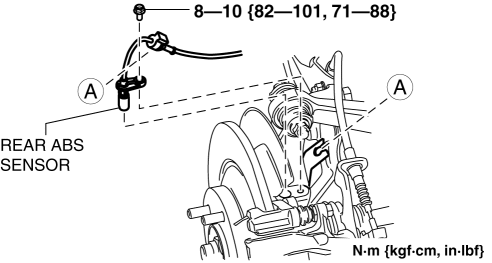
Performing the following procedures without first removing the rear ABS wheel-speed sensor may possibly cause an open circuit in the harness if it is pulled by mistake. Before performing the following procedures, disconnect the rear ABS wheel-speed sensor (axle side) and fix it to an appropriate place where the sensor will not be pulled by mistake while servicing the vehicle.
NOTE:
-
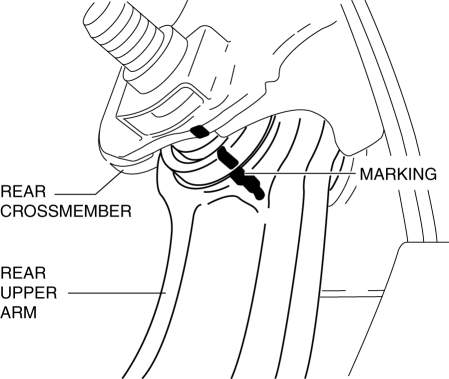
Mark the position before removing the rear upper arm.
-
Align the rear crossmember and rear upper arm markings when installing the rear upper arm.
-
Tighten the rear upper arm inner bolt completely before installing the rear crossmember component to the vehicle.
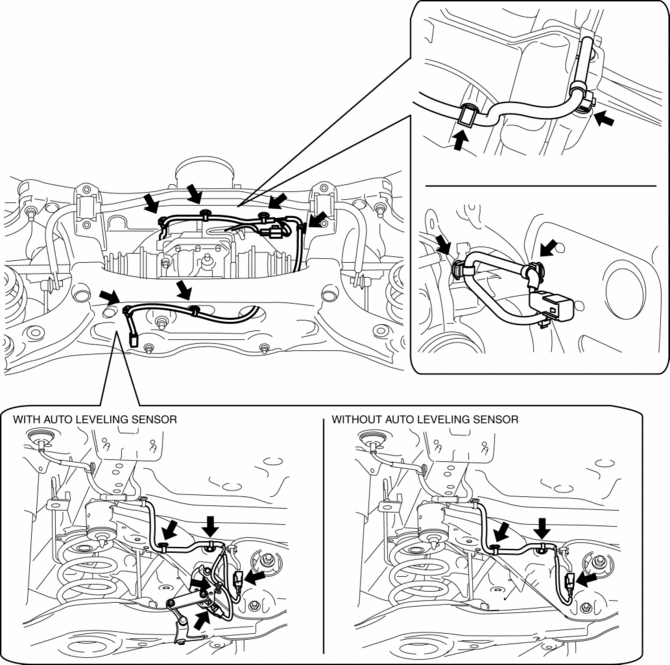
1. Disconnect the wiring harness clips and connectors installed to the rear crossmember.
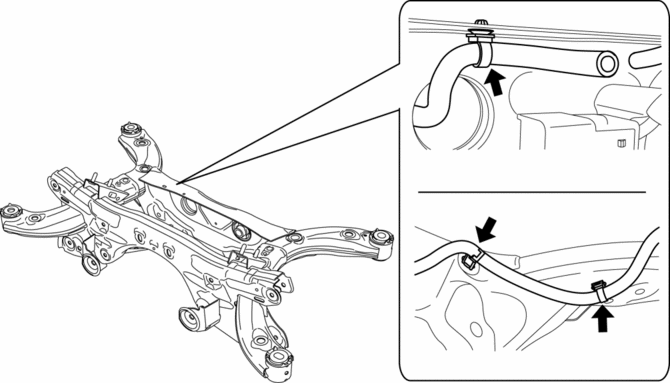
2. Set the rear differential breather hose aside.
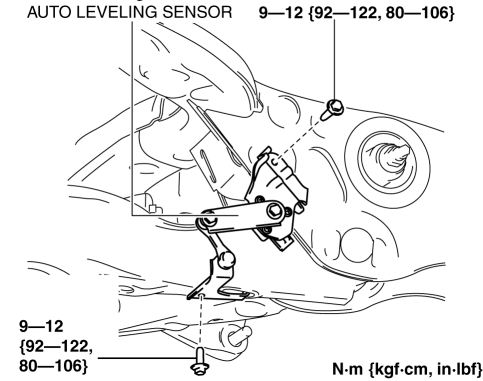
3. Remove the auto leveling sensor. (With auto leveling sensor).
4. Disconnect the rear ABS wheel-speed sensor wiring harness installed to rear hub support, then move aside the rear ABS sensor..
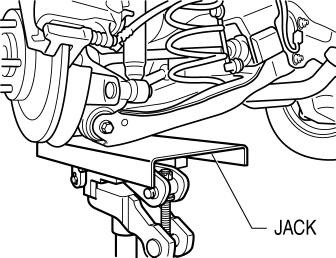
5. Jack up the vehicle to the unloaded condition, and support the rear trailing link component using a jack.
6. Align the rear crossmember component and rear upper arm and mark them.
7. Remove the propeller shaft..
8. Remove the TWC..
9. Remove the rear lateral link..
10. Remove the rear coil spring..
11. Remove the rear lower arm..
12. Remove the rear drive shaft..
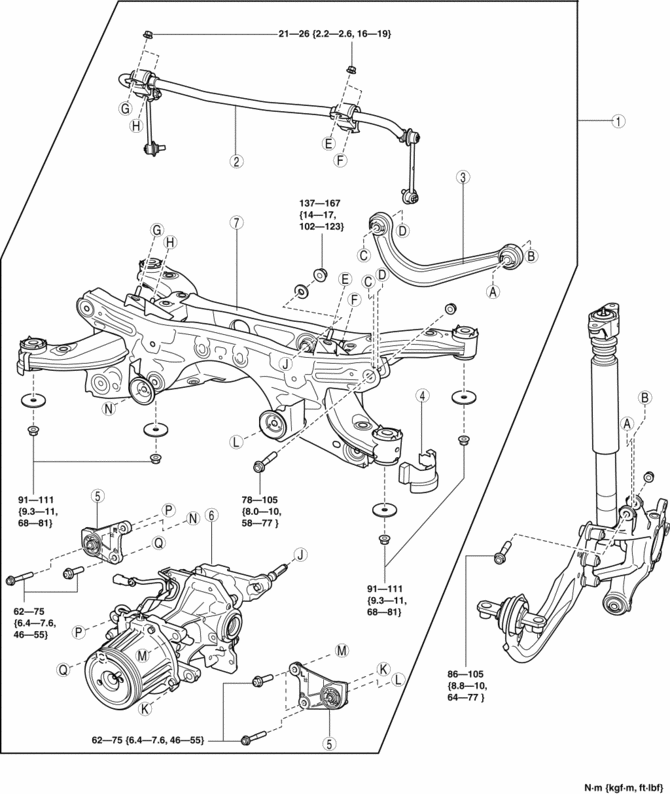
13. Remove in the order indicated in the table.
14. Install in the reverse order of removal.
15. Inspect the wheel alignment and adjust it if necessary..
|
1 |
Rear crossmember component (See Rear Crossmember Component Removal Note.) (See Rear Crossmember Component Installation Note.) |
|
2 |
Rear stabilizer component |
|
3 |
Rear upper arm . |
|
4 |
Rear crossmember mudguard |
|
5 |
Front differential mounting rubber (See REAR DIFFERENTIAL REMOVAL/INSTALLATION.) |
|
6 |
Rear differential component (See REAR DIFFERENTIAL REMOVAL/INSTALLATION.) |
|
7 |
Rear crossmember |
Rear Crossmember Component Removal Note
WARNING:
-
Verify that the rear crossmember is securely supported by a jack. If the rear crossmember falls off, it can cause serious injury or death, and damage to the vehicle.
1. Support the rear crossmember component with the jack and remove the nut.
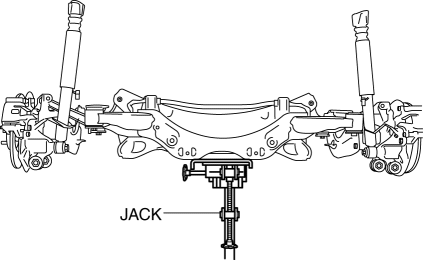
2. Remove the rear crossmember component.
Rear Crossmember Component Installation Note
WARNING:
-
Verify that the rear crossmember is securely supported by a jack. If the rear crossmember falls off, it can cause serious injury or death, and damage to the vehicle.
1. Support the rear crossmember component and install the rear crossmember.
 Rear Crossmember Removal/Installation [2 Wd]
WARNING:
Verify that the rear crossmember is securely supported by a jack. If the
rear crossmember falls off, it can cause serious injury or death, and damage
to the vehicle.
CAUTI ...
 Rear Pillar (Outer) Installation [Panel Replacement]
Symbol Mark
Installation Procedure
1. When installing new parts, measure and adjust the body as necessary to conform
with standard dimensions.
2. Drill holes for the plug welding before inst ...
Other materials:
Power Window System Preliminary Inspection [Power Window System]
Manual Open/Close Function Inspection
STEP
INSPECTION
ACTION
1
Switch the ignition ON (engine off or on).
Operate the power window using the manual open/close function on
the power window main swit ...
When Liftgate Cannot be Opened
When Liftgate Cannot be Opened
If the vehicle battery is dead or there is a malfunction in the electrical system
and the liftgate can not be opened, perform the following procedure as an emergency
measure to Open it: 1. Remove the cap on the interior surface of the liftgate with
a flathead sc ...
Charcoal Canister Inspection
U.S.A. And CANADA
Leakage inspection
1. Perform the following procedures:
Do not operate CV solenoid valve.
Assemble the hose used for inspection to port A.
Cover ports B and C with the caps.
CAUTION:
Do not apply a pressure 20 kPa {150 mmHg, 5.91 inHg} o ...
