
Mazda CX-5 Service & Repair Manual: Pressure Sensor [Two Step Deployment Control System]
Purpose
-
The pressure sensor determines at an earlier stage whether to detonate the air bag on the side of the vehicle (around front door) receiving an impact. This is for improved accuracy of the side air bag operation (deployment).
Function
-
When the vehicle is involved in a side-impact collision, the pressure sensor detects air pressure applied to the internal front door and sends an air bag deployment signal to the SAS control module.
Construction
-
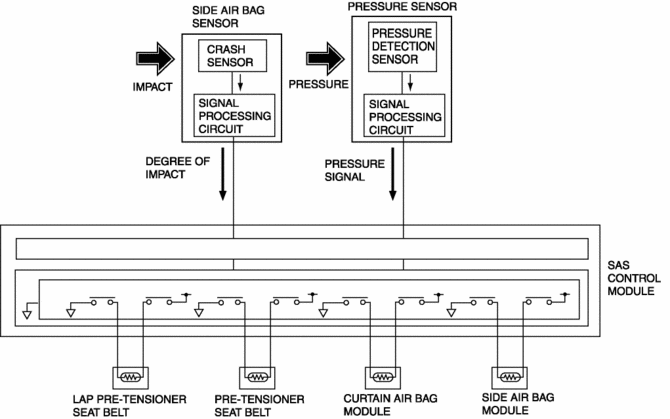
A pressure detection sensor is built into the pressure sensor.
-
Located inside the center of the front doors.
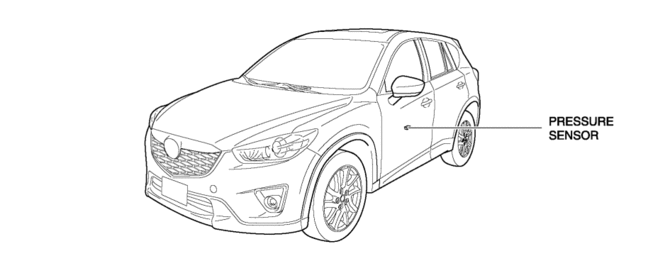
Operation
1. If the vehicle is involved in a side-impact collision, air pressure is generated in the sealed front door and applied to the pressure sensor.
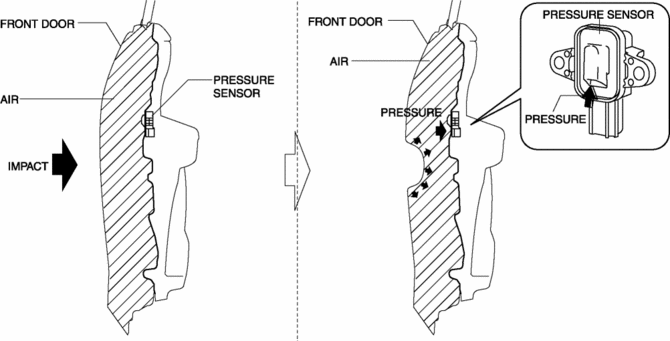
2. The pressure detection sensor built into the pressure sensor detects the pressure and converts the pressure into an electrical signal at the signal processing circuit.
3. The pressure signal, which is converted to an electrical signal, is sent to the SAS control module.
Fail-safe
-
Function not equipped.
 Pressure Sensor Removal/Installation [Two Step Deployment Control System]
WARNING:
Handling the pressure sensor improperly can accidentally operate (deploy)
the air bag module, which may seriously injure you. Read the air bag system
service warnings and cautio ...
 Refrigerant Pressure Sensor Inspection [Full Auto Air Conditioner]
1. Install the manifold gauge.
2. Verify the high-pressure side reading of the manifold gauge.
3. Measure the terminal voltage at PCM terminal 2BB, 2AX and 2AJ
4. Using the graph below, measure ...
Other materials:
Canister Vent (Cv) Solenoid Valve
U.S.A. And CANADA
Purpose, function
Seals the atmosphere side of the charcoal canister during EVAP leak check
monitoring.
Construction
Included in the charcoal canister.
The CV solenoid valve is consists of O-rings.
Operation
According to the ...
Engine Transaxle Integration Control [Fw6 A EL, Fw6 Ax EL]
Outline
The TCM controls engine output torque and reduces transaxle output shaft
torque fluctuation during auto shifting, and reduces shock occurring from the
vehicle during shifting.
Construction
Operation
During auto shifting, the TCM sends the torque reduction reque ...
Air Intake Actuator Inspection [Manual Air Conditioner]
1. Connect battery positive voltage to air intake actuator terminal B (or C),
connect terminal C (or B) to ground, and then verify that the air intake actuator
operates as shown in the table.
If the operation condition is not normal, replace the air intake actuator.
...
