
Mazda CX-5 Service & Repair Manual: Lights On Indicator Light
Purpose
-
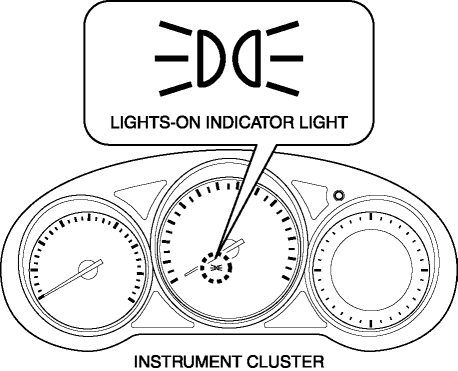
Notifies the user that the TNS or the headlights (LO) are on.
Function
-
Illuminates when the illumination conditions for the TNS, headlights (LO), or parking lights are met.
-
When the instrument cluster receives the TNS malfunction signal sent via CAN communication from the front body control module (FBCM), the indicator flashes.
Construction
-
Displayed in the instrument cluster.
Operation
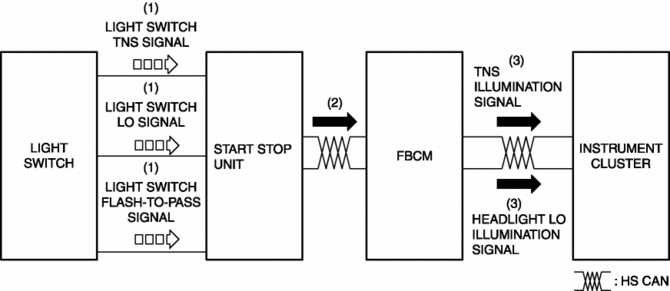
1. When the light switch is operated to the TNS, HEAD, or parking position, a light switch TNS, LO, or parking signal is sent to the start stop unit.
2. The start stop unit sends the light switch TNS, LO, or parking signal to the front body control module (FBCM).
3. The front body control module (FBCM) sends the light switch TNS, LO, or parking signal to the instrument cluster as a TNS illumination or headlight LO illumination signal.
4. When the instrument cluster receives the TNS illumination, or headlight LO illumination signal, it illuminates the lights-on indicator light.
Fail-safe
-
Function not equipped.
 Key Warning Light (Red)/Key Indicator Light (Green)
Purpose
KEY warning light (red)
The KEY warning indicator light (red) notifies the user that the engine cannot
be started, the remote transmitter is outside of the vehicle, or that there
...
 Lights On Reminder Warning Alarm
Purpose
The lights-on reminder warning alarm notifies the driver that the TNS and
headlights are not turned off.
Function
The instrument cluster receives the following vehicle c ...
Other materials:
Filament Inspection
1. Switch the ignition ON (engine off).
2. Turn the rear window defroster switch on.
CAUTION:
Directly touching the rear window defroster filament with the lead of the
tester could damage it. Wrap aluminum foil around the end of the lead and inspect
the filament by touching it ...
TCM Configuration [Fw6 A EL, Fw6 Ax EL]
NOTE:
The TCM is built into the control valve body.
1. Verify TCM configuration implementation necessity for replacement parts.
Replacement part
Configuration necessity
Control valve body replacement
Necessary
...
Panel Light
Purpose
The panel light adjusts the instrument cluster and steering switch illumination
brightness.
Function
The instrument cluster adjusts the brightness of the following illumination
lights when a TNS illumination signal sent via CAN transmission from the front
body co ...
