
Mazda CX-5 Service & Repair Manual: Front Console Box Removal/Installation
NOTE:
-
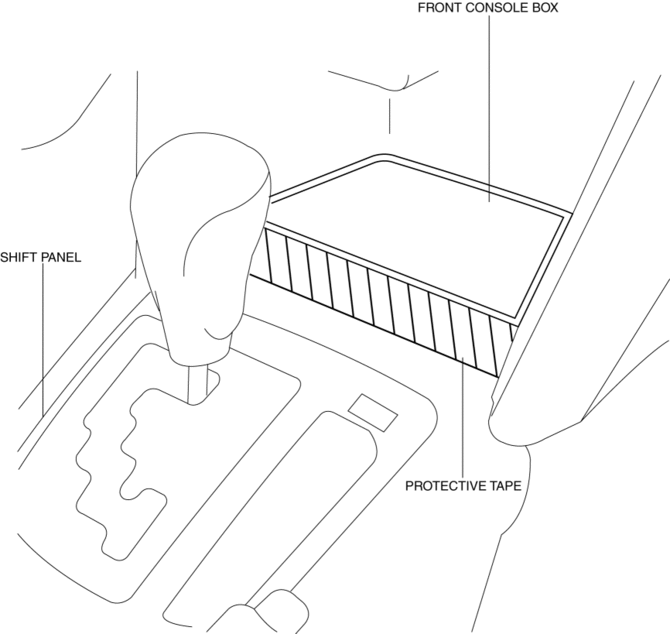
Affix protective tape to the position shown in the figure.
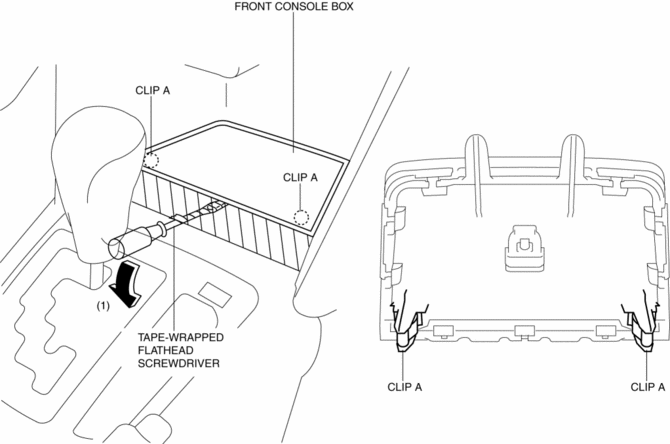
1. Insert a tape-wrapped flathead screwdriver in the position indicated by the arrow in the figure and detach clips A.
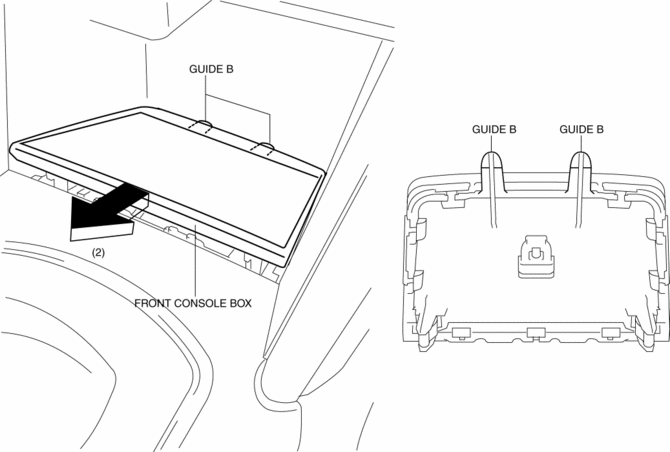
2. Pull the front console box in the direction of the arrow (2) and remove it while detaching the guides B.
NOTE:
-
When the occur to gap between the front console box and shift panel, remove the shift panel then assemble to the front console box. after install the front console box and shift panel as single unit.
3. Install in the reverse order of removal.
 Assist Handle Removal/Installation
Removal
1. Insert a tape-wrapped flathead screwdriver into the service hole and remove
the assist handle covers.
2. Remove the assist handle in the direction of the arrow (1) and (2), while
...
 Front Console Removal/Installation
CAUTION:
Affix protective tape to the position shown in the figure.
1. Disconnect the negative battery cable..
2. Remove the following parts:
a. Decoration panel.
b. Shift l ...
Other materials:
Windshield Washer Nozzle Removal/Installation
1. Remove the following parts:
a. Windshield wiper arm and blade.
b. Cowl grille.
2. Disconnect the windshield washer hose from the windshield washer nozzle..
3. While pressing windshield washer nozzle tabs in the direction of the arrow
(1) shown in the figure, pull the windshield washer ...
Front Door Key Cylinder Switch Inspection
1. Perform the front door glass preparation..
2. Disconnect the negative battery cable..
3. Remove the following parts:
a. Inner garnish.
b. Front door trim.
c. Front door key cylinder.
d. Front door glass.
e. Front door module panel.
f. Front door latch and lock actuator.
Front Do ...
Add-On Non-Genuine Parts and Accessories
Non-genuine parts and accessories for Mazda vehicles can be found in stores.
These may fit your vehicle, but they are not approved by Mazda for use with Mazda
vehicles. When you install non-genuine parts or accessories, they could affect your
vehicle's performance or safety systems; the Maz ...
