
Mazda CX-5 Service & Repair Manual: Keyless Warning Alarm
Purpose
-
The keyless warning alarm notifies the driver that the remote transmitter cannot be verified or the steering lock cannot be released.
Function
-
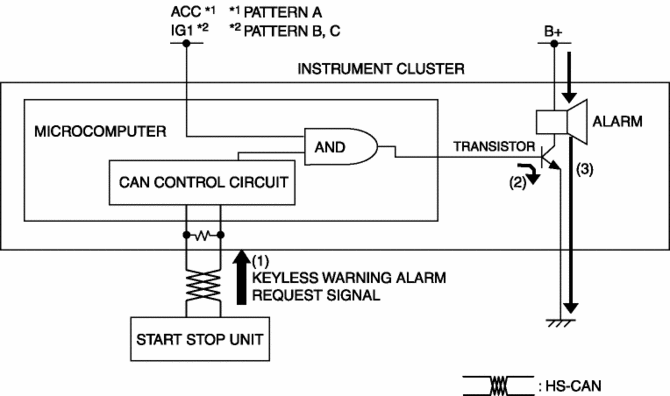
When the instrument cluster receives the keyless warning alarm request signal sent from the start stop unit via the CAN signal, the keyless warning alarm sounds.
-
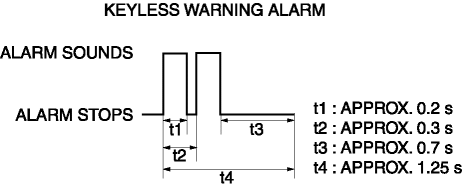
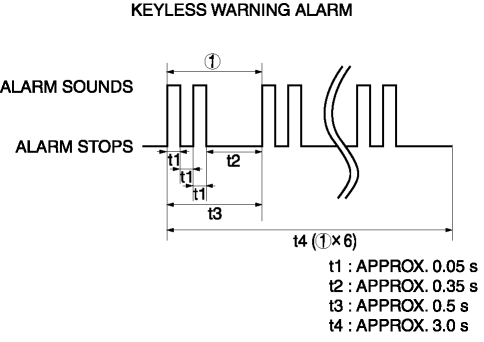
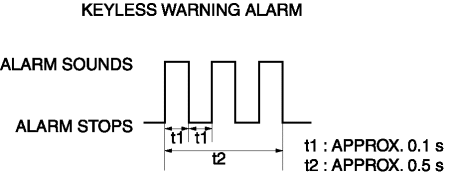
The keyless warning alarm sound pattern is as shown in the figure. For the conditions that the alarm for each pattern sounds, refer to KEYLESS ENTRY SYSTEM (without advanced keyless entry system)/ADVANCED KEYLESS ENTRY SYSTEM (with advanced keyless entry system).
Pattern A
Pattern B
Pattern C
Construction
-
The keyless warning alarm sounds using the buzzer built into the instrument cluster.
Operation
1. The instrument cluster receives (1) the keyless warning alarm request signal from the start stop unit.
2. The instrument cluster microcomputer turns the transistor on (2) based on the keyless warning alarm request signal.
3. When the transistor turns on, the ground circuit of the alarm is established and the alarm sounds (3).
Fail-safe
-
Function not equipped.
 Keyless Beeper Removal/Installation
1. Disconnect the negative battery cable..
2. Remove the cowl grille..
3. Disconnect the connector.
4. Pull the keyless buzzer in the direction of the arrow (2) shown in the figure
while p ...

Other materials:
Car Navigation Unit Removal/Installation
CAUTION:
The audio unit communicates with the car-navigation unit and records the
presence/non-presence of the car-navigation unit when the ignition is switched
to ACC or ON (engine off or on) after connecting the negative battery cable.
If the commander switch is installed ...
Front Outer Handle Removal/Installation
1. Perform the front door glass preparation..
2. Disconnect the negative battery cable..
3. Remove the following parts:
a. Inner garnish.
b. Front door trim.
c. Front door glass.
d. Front door module panel.
e. Front door key cylinder.
4. Disconnect the keyless antenna connector (With ...
Rear Body Control Module (Rbcm) Removal/Installation
CAUTION:
If configuration is not performed when the rear body control module (RBCM)
is replaced with a new one, the vehicle specification information is not stored
in the rear body control module (RBCM) and the system will not operate normally.
When performing configuration, it ...
