
Mazda CX-5 Service & Repair Manual: Hood Latch And Release Lever Removal/Installation
Hood Latch
1. Open the hood.
2. Disconnect the negative battery cable..
3. Remove the front bumper..
4. Insert a tape-wrapped flathead screwdriver into the position shown in the figure.
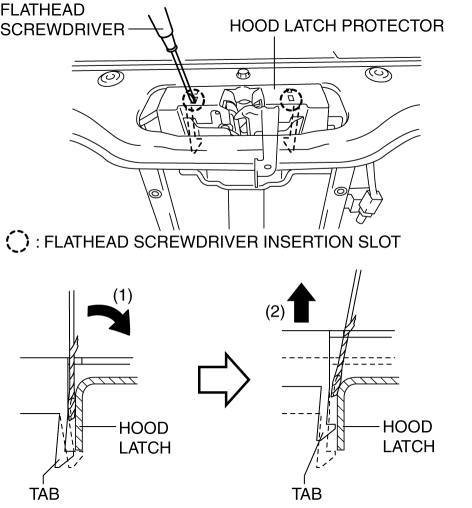
5. Move the tape-wrapped flathead screwdriver in the direction of arrow (1) shown in the figure to press the hood latch protector tab, and lift the tab up in the direction of arrow (2) and detach its tab from the fuse box.
6. Detach all the hood latch protector tabs from the hood latch and remove the hood latch protector.
7. While pressing the tabs of the clip in the direction of arrow (1) shown in the figure, press it in the direction of arrow (2) to detach the connector tabs from the body.
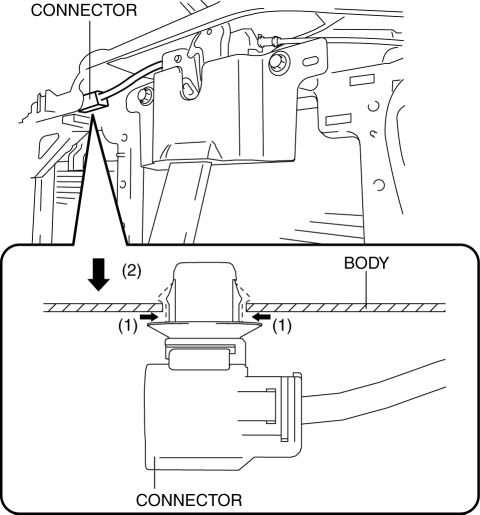
8. Remove the connector antenna from the body.
9. Disconnect the connector.
10. Disconnect the hood release cable.
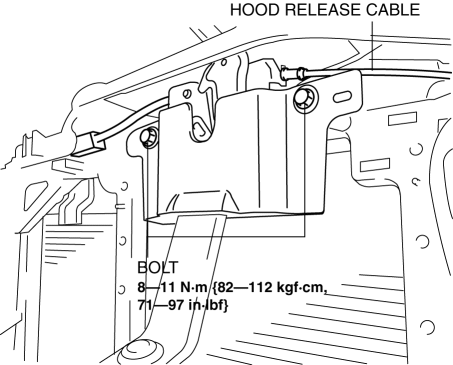
11. Remove the bolts.
12. Remove the hood latch.
13. Install in the reverse order of removal.
14. Adjust the hood..
Hood Release Lever
1. While pulling the hood release lever, insert a tape-wrapped flathead screwdriver into the position shown in the figure.
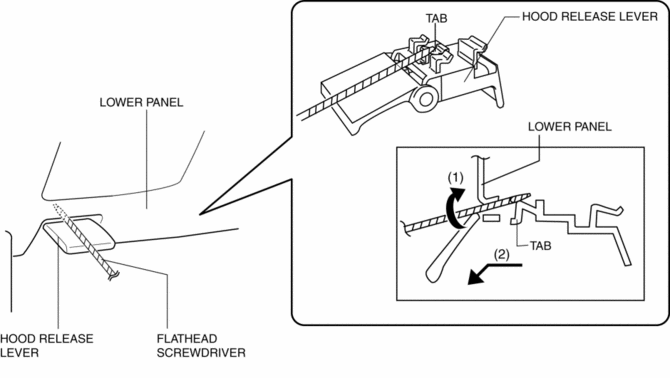
2. Move the tape-wrapped flathead screwdriver in the direction of arrow (1) shown in the figure to press the tab, and pull the hood release lever in the direction of arrow (2) to detach it from the lower panel.
CAUTION:
-
Remove the hood release lever while being careful not to damage the hood release cable with the flathead screwdriver.
3. Pull the hood release lever to remove it from the lower panel.
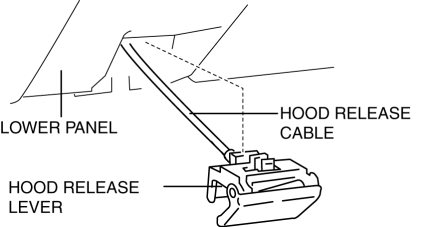
4. Disconnect the hood release cable from the hood release lever.
5. Install in the reverse order of removal.
 Hood Disassembly/Assembly
1. Disassemble in the order indicated in the table.
1
Fastener
2
Hood insulator
3
Shroud seaming welt
...
 Hood Latch Switch
Purpose
Detects the open/closed condition of the hood.
Function
The hood latch switch is utilized in the theft-deterrent system control.
For the theft-deterrent system ...
Other materials:
Floor Side Panel Removal [Panel Replacement]
Symbol Mark
Removal Procedure
1. Drill the 35 locations indicated by (A) shown in the figure, then remove the
floor side panel No.1.
2. Drill the 5 locations indicated by (B) shown in the figure.
3. Drill the 4 locations indicated by (C) from rear wheel housing shown in the
figure. ...
Windshield Wiper Arm And Blade Removal/Installation
Windshield Wiper Arm
1. Open the hood.
CAUTION:
If excessive force is applied when removing the cap, tabs could break. Carefully
remove the cap.
2. Insert a tape-wrapped precision flathead screwdriver into the gap between
the windshield wiper arm and cap, and slightly raise the ...
DSC HU/CM Inspection
1. Disconnect the DSC HU/CM connector..
2. Connect the negative battery cable..
3. Attach the tester lead to the DSC HU/CM wiring harness-side connector and
inspect voltage, continuity, or resistance according to the standard (reference)
on the table.
Standard (Reference)
...
