
Mazda CX-5 Service & Repair Manual: Front Over Fender Removal/Installation
1. Remove fastener A.
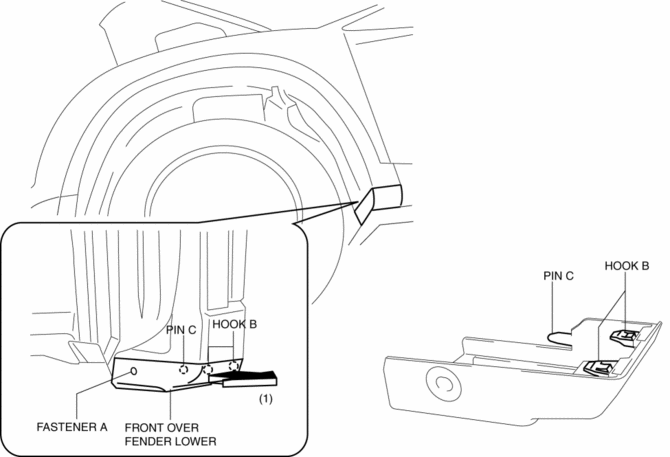
2. Pull the front over fender lower in the direction of the arrow (1) while removing hook B and pin C.
3. Remove fasteners D.
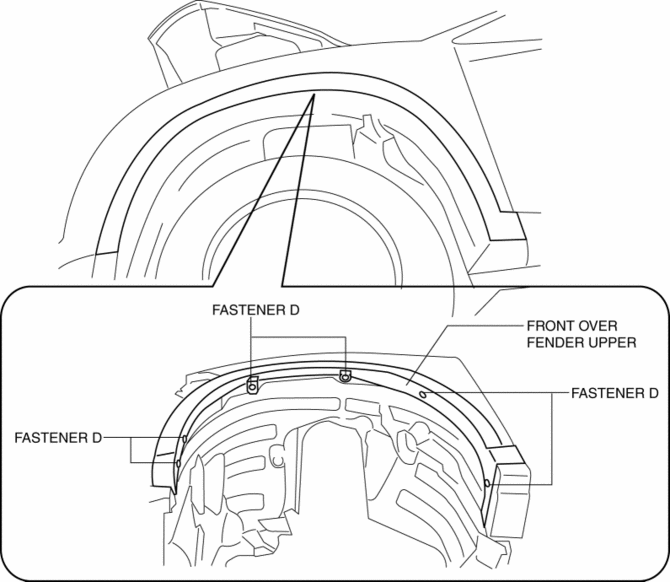
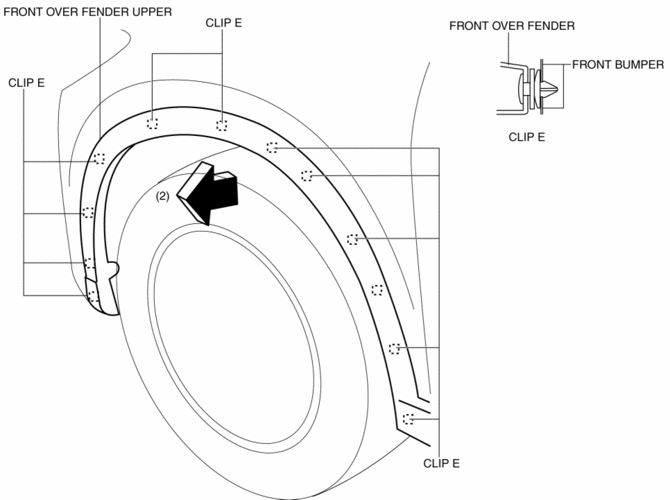
4. Pull the front over fender upper in the direction of the arrow (2) while removing clips E.
5. Install in the reverse order of removal.
 Front Fender Panel Removal/Installation
1. Disconnect the negative battery cable..
2. Remove the following parts:
a. Front bumper.
b. Front combination light.
c. Front bumper slider.
d. Front over fender.
3. Remove bolts A and f ...
 Front Under Cover No.1 Removal/Installation
1. Remove bolts A.
2. Remove screws B.
3. Remove fasteners C.
4. Remove the front under cover No.1 in the direction of the arrow in the order
of (1), (2) shown in the figure while detachin ...
Other materials:
Headlight Leveling Actuator
Purpose, Function
The headlight leveling actuator drives the motor based on the target optical
axis voltage, which is input from the AFS control module, to change the optical
axis of the headlights.
Construction
Built into the front combination lights.
Consists of ...
Fuel Gauge Sender Unit Inspection [2 Wd]
NOTE:
For the fuel gauge sender unit removal/installation, refer to the fuel pump
removal/installation because the fuel gauge sender unit is integrated with the
fuel pump..
1. Verify that the resistance at fuel gauge sender unit terminals D and C is
as indicated in the table ac ...
Eps Control Module Inspection
1. Remove the driver-side front scuff plate..
2. Remove the driver-side front side trim..
3. Remove the car-navigation unit (with car-navigation system)..
4. Remove the switch panel..
5. Remove the decoration panel..
6. Remove the shift lever knob (MTX vehicles)..
7. Remove the selector ...
