
Mazda CX-5 Service & Repair Manual: Floor Under Cover Removal/Installation
1. Lift up the vehicle.
2. Remove bolts A.
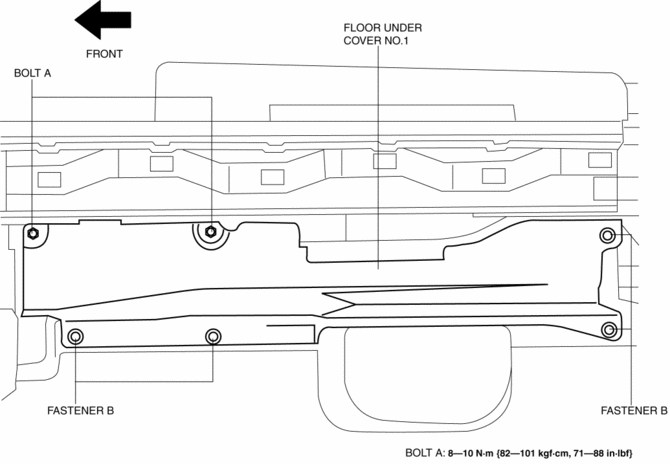
3. Remove fasteners B.
4. Remove the floor under cover No.1.
5. Remove nuts C.
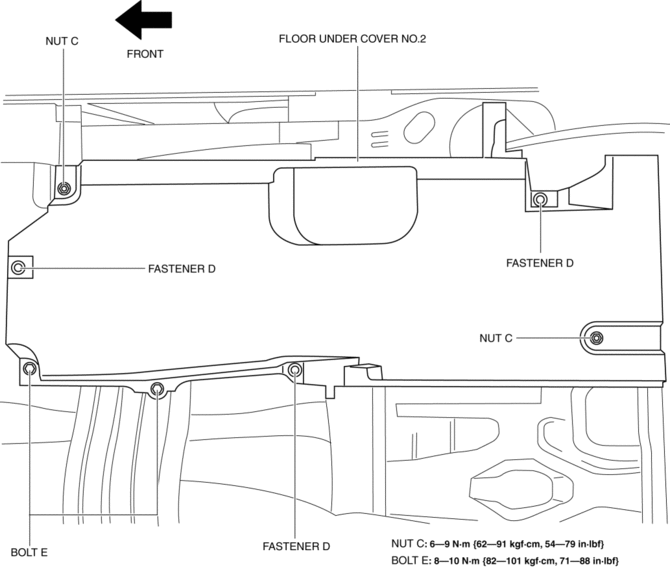
6. Remove fasteners D.
7. Remove bolts E.
8. Remove the floor under cover No.2.
9. Remove bolts F.
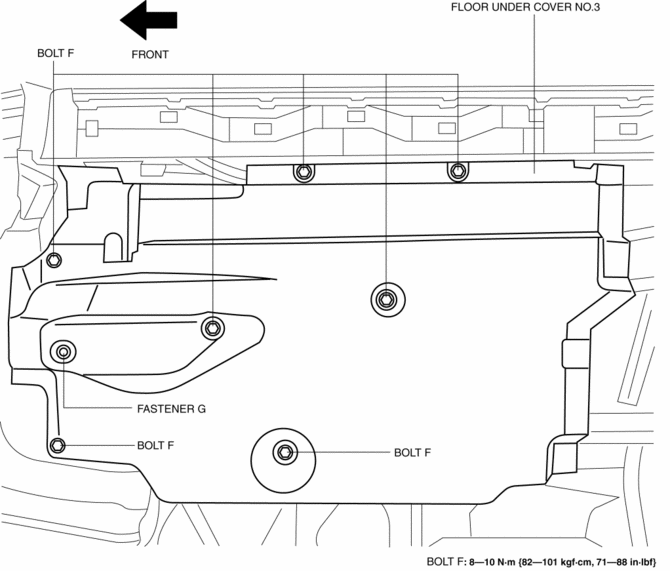
10. Remove the fastener G.
11. Remove the floor under cover No.3.
12. Install in the reverse order of removal.
 Floor Side Panel Removal [Panel Replacement]
Symbol Mark
Removal Procedure
1. Drill the 35 locations indicated by (A) shown in the figure, then remove the
floor side panel No.1.
2. Drill the 5 locations indicated by (B) shown in th ...
 Front Beltline Molding Removal/Installation
CAUTION:
Affix protective tape to the position shown in the figure.
1. Fully open the front door glass.
2. Insert a tape-wrapped flathead screwdriver and then detach clips A in the ...
Other materials:
Front Combination Light Removal/Installation
WARNING:
Incorrect servicing of the discharge headlights could result in electrical
shock. Before servicing the discharge headlights, always refer to the service
warnings..
NOTE:
Fogging or condensation on the inside of the front combination lights may
occur due to a n ...
Shift Lock System [Fw6 A EL, Fw6 Ax EL]
Purpose, Function
The shift-lock system operates when the ignition is switched to ON and the
brake pedal is not depressed, and inhibits the selector lever from being shifted
from the P position to other positions.
If the shift-lock cannot be released by the normal operation, it ...
Up Switch [Fw6 A EL, Fw6 Ax EL]
Purpose/Function
The up switch detects the shift up operation of the selector lever.
The up switch signal is sent to the TCM via CAN and is used for manual shift
control and engine-transaxle integration control.
Construction
The up switch is installed to the selector l ...
