
Mazda CX-5 Service & Repair Manual: Center Accessory Socket Inspection
1. Remove the center accessory socket..
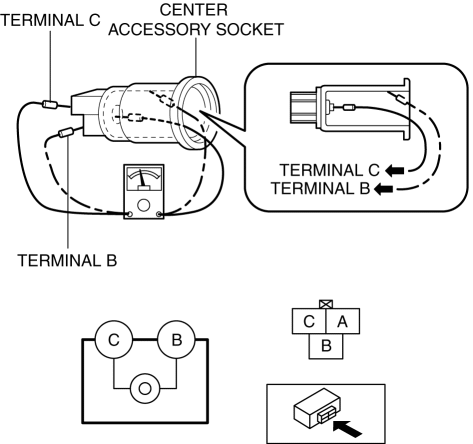
2. Connect the tester probe to the position shown in the figure and verify that there is continuity.
-
If it cannot be verified, replace the center accessory socket..
 Accessory Socket
Purpose
By inserting the plug of an electrical device, 12 V (maximum 120 W) of power
is supplied enabling use of the electrical device in the vehicle.
Function
Front accessory socket
...
 Center Accessory Socket Removal/Installation
1. Disconnect the negative battery cable..
2. Remove the upper console..
3. Insert a tape-wrapped flathead screwdriver into the gap between the cap tab
and socket.
4. Move the flathead scr ...
Other materials:
Refrigerant Line Removal/Installation
1. Disconnect the negative battery cable..
2. Discharge the refrigerant..
3. Disconnect the engine ground.
4. Disconnect the refrigerant pressure sensor connector.
5. Remove in the order indicated in the table. Do not allow compressor oil to
spill.
CAUTION:
If moisture or for ...
Engine Removal/Installation
WARNING:
A hot engine can cause severe burns. Turn off the engine and wait until it
is cool before servicing.
Fuel vapor is hazardous. It can very easily ignite, causing serious injury
and damage. Always keep sparks and flames away from fuel.
Fuel line spills and leakag ...
ABS Wheel Speed Sensor And ABS Sensor Rotor
Purpose/Function
The ABS wheel-speed sensor and ABS sensor rotor detect the rotation condition
of each wheel and transmit this information to the DSC HU/CM.
The signal from the ABS wheel-speed sensor is the primary signal that the
DSC HU/CM uses when carrying out control.
...
