
Mazda CX-5 Service & Repair Manual: Center Accessory Socket Removal/Installation
1. Disconnect the negative battery cable..
2. Remove the upper console..
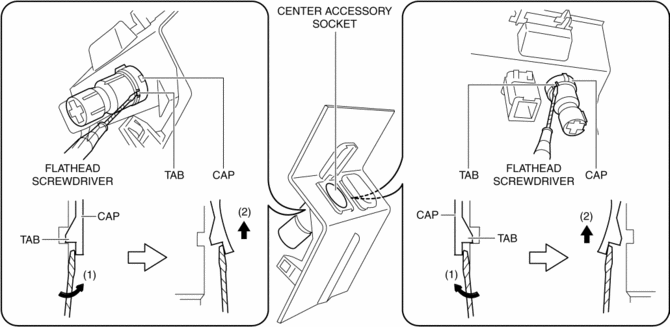
3. Insert a tape-wrapped flathead screwdriver into the gap between the cap tab and socket.
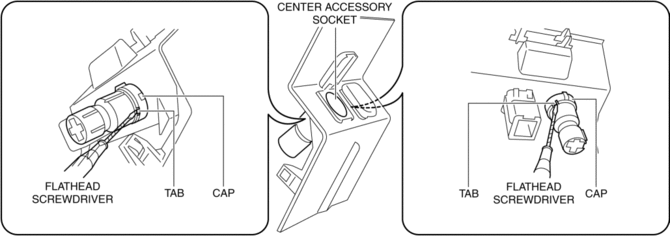
4. Move the flathead screwdriver in the direction of the arrow (1) shown in the figure, press the center accessory socket in the direction of the arrow (2) shown in the figure, and detach the cap tab from the socket.
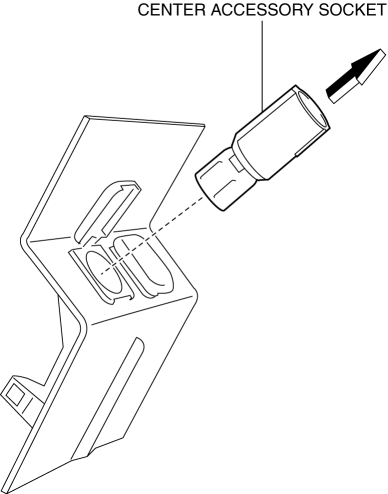
5. Pull the center accessory socket in the direction of the arrow shown in the figure and remove it.
6. While pressing the clip tabs in the direction of arrows (3) shown in the figure, press the cap in the direction of arrow (4) to detach the cap tabs from the upper console.
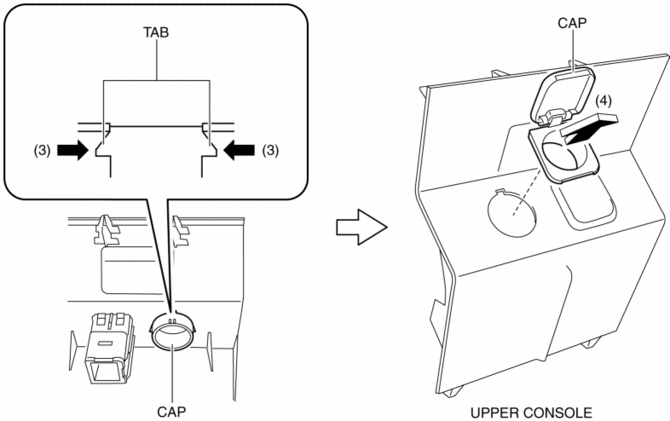
7. Remove the cap.
8. Install in the reverse order of removal.
 Center Accessory Socket Inspection
1. Remove the center accessory socket..
2. Connect the tester probe to the position shown in the figure and verify that
there is continuity.
If it cannot be verified, replace the cente ...
 Front Accessory Socket Inspection
1. Remove the front accessory socket..
2. Connect the tester probe to the position shown in the figure and verify that
there is continuity.
If it cannot be verified, replace the front ...
Other materials:
Evaporator Temperature Sensor [Full Auto Air Conditioner]
Purpose
The evaporator temperature sensor detects the airflow temperature passing
through the evaporator.
Function
The evaporator temperature sensor converts the detected temperature to an
electric signal.
Construction
A thermistor-type evaporator temperature s ...
Radiator
Purpose, Function
The radiator disperses the engine coolant heat flowing internally by receiving
against the vehicle while it is driven or air flow produced by the cooling fan.
Construction
The radiator is installed to the front of the engine compartment.
Four mounting ...
Fuel Injector Relay [Skyactiv G 2.0]
Purpose, Function
Supplies power to the PCM for the fuel injector and spill valve control solenoid
valve operation.
Construction
The fuel injector relay is installed in the relay and fuse block.
Operation
When the ignition is switched ON, the battery voltage ...
