
Mazda CX-5 Service & Repair Manual: Antenna Feeder No.2 Inspection
1. Disconnect the negative battery cable..
2. Remove the following parts:
a. A-pillar trim (RH).
b. Trunk board.
c. Trunk end trim (RH).
d. Rear scuff plate (RH).
e. Trunk side trim (RH).
3. Disconnect antenna feeder No.1.
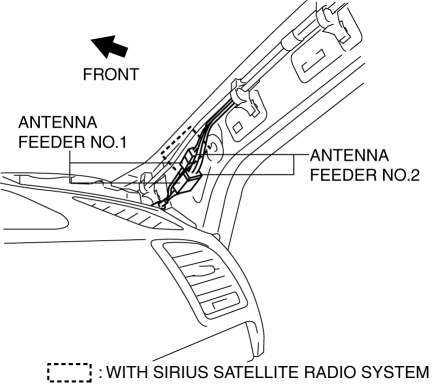
4. Disconnect antenna feeder No.3.
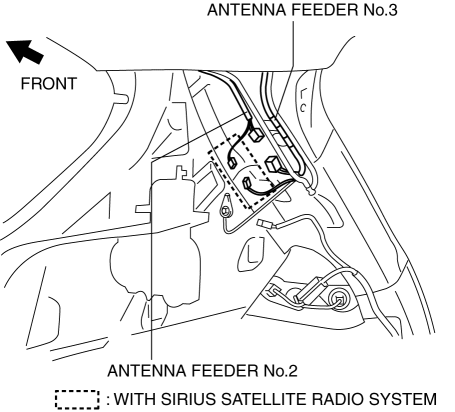
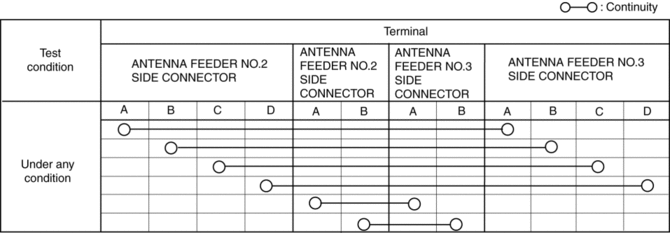
5. Verify that the continuity between antenna feeder No.2 terminals is as indicated in the table.
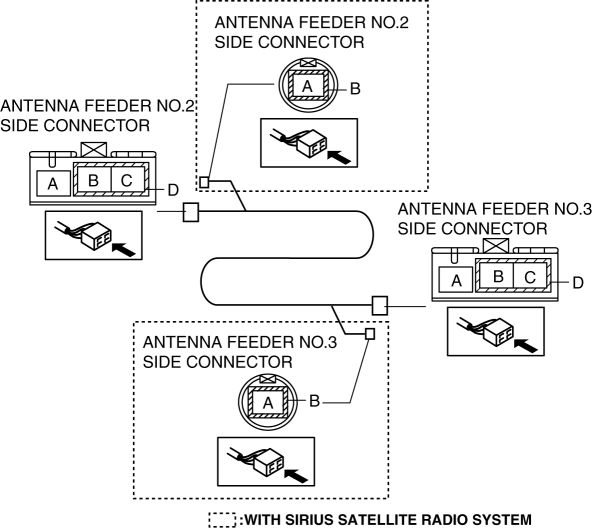
-
If not as indicated in the table, replace antenna feeder No.2.
 Antenna Feeder No.1 Removal/Installation
With audio system
1. Disconnect the negative battery cable..
2. Remove the following parts:
a. Side speaker grille (RH).
b. Tweeter (RH).
c. A-pillar trim.
d. Passenger-side front scuff pla ...
 Antenna Feeder No.2 Removal/Installation
Removal
1. Disconnect the negative battery cable..
2. Remove the following parts:
a. Sunroof seaming welt (with sunroof system).
b. A-pillar trim.
c. Front map light.
d. Sunvisor.
e. Fron ...
Other materials:
Immobilizer System
The immobilizer system allows the engine to start only with a key the system
recognizes.
If someone attempts to start the engine with an unrecognized key, the engine
will not start, thereby helping to prevent the theft of your vehicle.
If you have a problem with the immobilizer system or the k ...
Windshield Wiper Motor
Purpose
The windshield wiper motor transmits rotation force to the windshield wiper
link to operate the windshield wiper arms and blades.
Function
The windshield wiper motor operates using the current from the front body
control module (FBCM) which is input according to the ...
Buckle Switch Inspection
Driver-side
1. Switch the ignition to off.
2. Disconnect the negative battery cable and wait for 1 min or more..
3. Remove the front seat..
4. Remove the front buckle..
5. Inspect for continuity between the buckle switch terminals using a tester.
If not as indicated in the tab ...
