
Mazda CX-5 Service & Repair Manual: Air Bag System Warning Light [Two Step Deployment Control System]
Purpose
-
The air bag system warning light notifies the driver of a malfunction in the SRS air bag system.
Function
-
If a malfunction occurs in the SRS air bag system, the air bag system warning light illuminates or flashes.
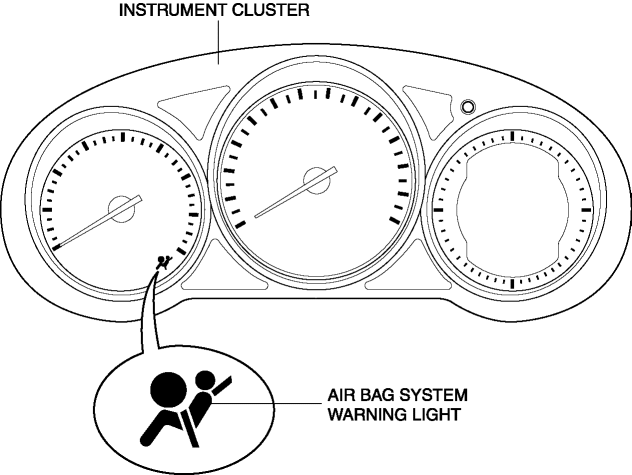
Construction
-
LEDs (light-emitting diode) have been adopted for the air bag system warning light.
-
The air bag system warning light is built into the instrument cluster.
Operation
-
When the ignition is switched ON, the instrument cluster illuminates the air bag system warning light for a specified period to indicate that the SRS air bag system is performing initialization diagnostics. If there is no malfunction in the SRS air bag system, the indicator light turns off.
-
If the SAS control module detects a malfunction in the SRS air bag system, it sends a warning signal to the instrument cluster via CAN communication. The instrument cluster illuminates or flashes the air bag system warning light based on the warning signal it receives to display the DTC.
-
If there is a malfunction in the SRS air bag system, the air bag system warning light displays DTCs according to the following patterns:
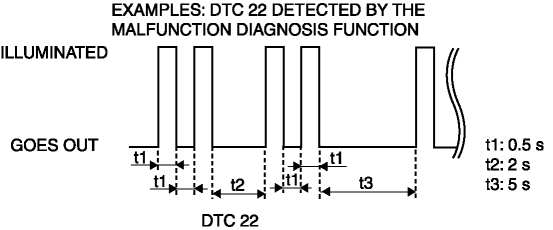
-
If there are several malfunctions in the SRS air bag system, the DTC of the highest priority ranking is displayed first.
Fail-safe
-
Function not equipped.
 Air Bag System Warning Light [Standard Deployment Control System]
Purpose
The air bag system warning light notifies the driver of a malfunction in
the SRS air bag system.
Function
If a malfunction occurs in the SRS air bag system, the air bag ...
 Automatic Transaxle Warning Light [Fw6 A EL, Fw6 Ax EL]
Purpose/Function
The automatic transaxle warning light illuminates when the transaxle has
malfunction.
Construction
The automatic transaxle warning light is built into the instr ...
Other materials:
Brake System/ABS Warning Light
Purpose/Function
The brake system/ABS warning light is built into the instrument cluster.
If a malfunction is detected in the system with the parking brake released,
the warning light illuminates to notify the driver.
Construction/Operation
When the DSC system and CAN l ...
Radiator
Purpose, Function
The radiator disperses the engine coolant heat flowing internally by receiving
against the vehicle while it is driven or air flow produced by the cooling fan.
Construction
The radiator is installed to the front of the engine compartment.
Four mounting ...
Curtain Air Bag Module [Standard Deployment Control System]
Purpose
When a curtain air bag module receives an impact from a lateral collision,
the operation (deployment) of the air bag mediates the impact to the head of
the driver and front passenger.
Function
When a curtain air bag module receives an impact from a lateral collision ...
