
Mazda CX-5 Service & Repair Manual: A/C Compressor Removal/Installation
1. Disconnect the negative battery cable..
2. Discharge the refrigerant..
3. Remove the front under cover No.2..
4. Remove the drive belt..
5. Disconnect the connector.
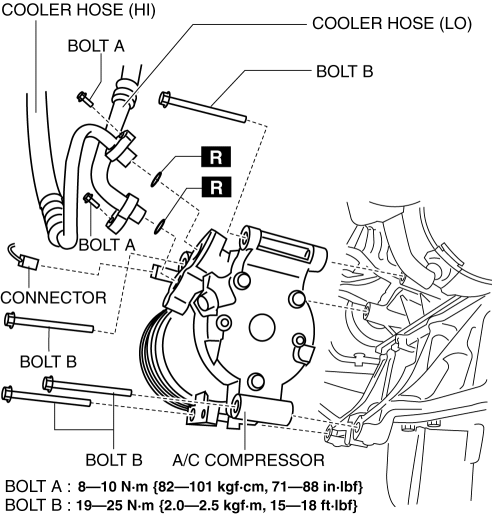
6. Remove bolts A.
CAUTION:
-
If moisture or foreign material enters the refrigeration cycle, cooling ability will be lowered and abnormal noise or other malfunction could occur. Always plug open fittings immediately after removing any refrigeration cycle parts.
7. Remove the cooler hose (LO)..
8. Remove the cooler hose (HI)..
9. Remove bolts B.
10. Remove the A/C compressor. Do not allow compressor oil to spill..
11. Install in the reverse order of removal.
12. Perform the refrigerant system performance test..
A/C Compressor Installation Note
CAUTION:
-
Due to the high moisture-absorption characteristics of the compressor oil, it may absorb moisture if left over a long period of time thereby negatively affecting A/C operation. Drain the compressor oil and refill within 10 min. of each other.
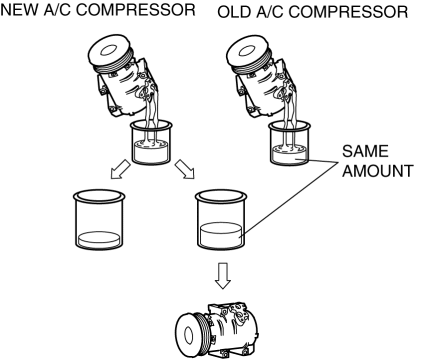
1. Rotate the new A/C compressor shaft six to eight revolutions while pouring refrigerant oil in a clean measuring container. Use this refrigerant oil to refill new compressor. Do not allow refrigerant oil to become contaminated.
2. Rotate old A/C compressor shaft six to eight revolutions while pouring refrigerant oil in a separate, clean measuring container.
3. Compare those oil amounts. The amount of the oil drained from the new A/C compressor should be greater than the old one.
4. Pour the same amount oil drained from the old A/C compressor back into the new A/C compressor.
-
A/C compressor oil type
-
FD46XG
-
A/C compressor oil sealed volume (approx. quantity)
-
100 ml {100 cc, 3.38 fl oz}
 A/C Compressor Control [Full Auto Air Conditioner]
Purpose
The A/C compressor control switches the A/C compressor on/off according to
the vehicle environment.
Function
The A/C compressor control turns the A/C compressor on/off b ...
 A/C Cut Off Control [Skyactiv G 2.0]
Outline
Controls the A/C operation by switching the A/C relay ON/OFF at the optimal
timing according to engine operation conditions. Acceleration performance and
A/C compressor reliabilit ...
Other materials:
Engine Coolant Temperature (ECT) Sensor
Purpose/Function
Detects the ECT as basic information for mainly determining the fuel injection
amount.
Detects the ECT and inputs it to the PCM as an ECT signal.
The ECT sensor No.2 is only used for OBD.
Construction
ECT sensor No.1
Installed to the water out ...
Rear Differential Assembly
WARNING:
The engine stand is equipped with a self-lock mechanism, however, if the
rear differential is in a tilted condition, the self-lock mechanism could become
inoperative. If the rear differential unexpectedly rotates it could cause injury,
therefore do not maintain the rear dif ...
Rear Seat Back Frame Removal/Installation
CAUTION:
When performing the procedure with a rear seat removed from the vehicle,
perform the procedure on a clean cloth so as not to damage or soil the seat.
6:4 Split Type
1. Remove the trunk board..
2. Remove the rear seat back..
3. Remove the headrest.
4. Open fasteners A ...
