
Mazda CX-5 Service & Repair Manual: Air Fuel Ratio (A/F) Sensor Inspection
A/F Sensor Inspection
1. Connect the M-MDS to the DLC?2.
2. Switch the ignition ON (engine on).
3. Warm up the engine to normal operating temperature.
4. Access the following PIDs using the M-MDS..
-
VSS (Vehicle speed)
-
RPM (Engine speed)
-
O2S11 (A/F sensor output current)
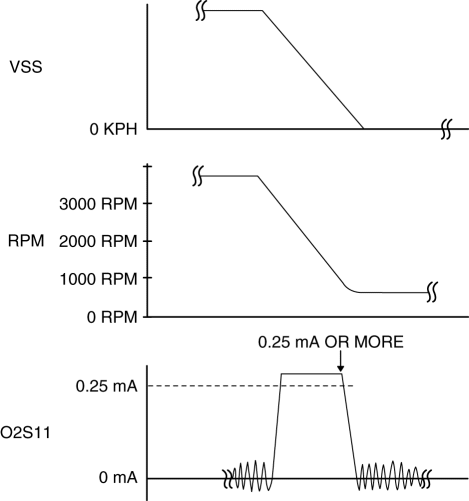
5. Drive the vehicle and decelerate the engine speed by releasing the accelerator pedal fully when the engine speed is 3,000 rpm or more
.
6. Verify that the A/F sensor output current (PID: O2S11) is 0.25 mA or more
while decelerating as shown in the figure.
-
If not as specified, replace the A/F sensor..
A/F Sensor Heater Inspection
WARNING:
-
A hot engine and exhaust system can cause severe burns. Turn off the engine and wait until they are cool before removing the exhaust system.
1. Disconnect the negative battery cable..
2. Disconnect the A/F sensor connector.
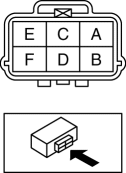
3. Measure the resistance between A/F sensor terminals A and E.
-
If not as specified, replace the A/F sensor..
-
A/F sensor heater resistance
-
1—10 ohms [normal temperature]
 Air Fuel Ratio (A/F) Sensor Heater Control
Outline
Based on the control of the A/F sensor heater, a stabilized oxygen concentration
is detected even at low exhaust temperatures, and feedback control of fuel injection
even at cold ...
 Air Fuel Ratio (A/F) Sensor Removal/Installation
WARNING:
A hot engine and exhaust system can cause severe burns. Turn off the engine
and wait until they are cool before removing the exhaust system.
CAUTION:
Do not allow fla ...
Other materials:
Turbine/Input Shaft Speed Sensor, Output Shaft Speed Sensor [Fw6 A EL, Fw6 Ax
EL]
Purpose/Function
The turbine/input shaft speed sensor detects the rotation speed of the input
shaft (low clutch drum).
The output shaft speed sensor detects the rotation speed of the output shaft
(primary gear).
The turbine/input shaft speed sensor and output shaft speed ...
Dashboard Under Cover Removal/Installation
1. Detach hooks A in the direction of arrow (1) shown in the figure.
2. Pull the dashboard under cover in the direction of arrow (2) while detaching
pins B.
3. Remove the dashboard under cover in the direction of the arrow (3) shown in
the figure while detaching the guide C.
CAUTION:
...
Discharge Headlight Control Module Removal/Installation
WARNING:
Incorrect servicing of the discharge headlights could result in electrical
shock. Before servicing the discharge headlights, always refer to the service
warnings..
1. Disconnect the negative battery cable..
2. Remove the front bumper..
3. Disconnect the connector.
...
