
Mazda CX-5 Service & Repair Manual: Corner Junction Installation [Panel Replacement]
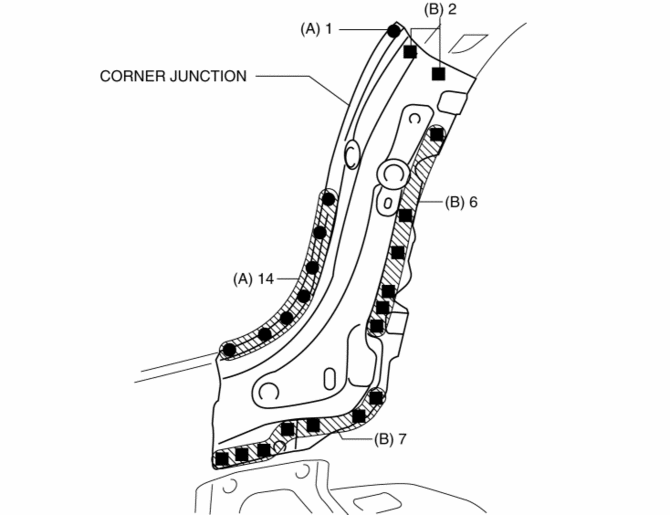
Symbol Mark

Installation Procedure
1. When installing new parts, measure and adjust the body as necessary to conform with standard dimensions.
2. Drill holes for the plug welding before installing the new parts.
3. After temporarily installing new parts, make sure the related parts fit properly.
4. Spot weld the 15 locations indicated by (A) shown in the figure.
5. Plug weld the 15 locations indicated by (B) shown in the figure, then install the corner junction.

 Corner Junction Removal [Panel Replacement]
Symbol Mark
Removal Procedure
1. Drill the 27 locations shown in the figure.
2. Remove the corner junction. ...
Other materials:
Glass Antenna
Purpose, Function
The RDS (Radio Data System) converts radio broadcast waves to electric signals
and sends the signals to the audio unit.
Construction
An antenna with excellent noise resistance has been adopted to the rear window
glass.
Fail-safe
Function n ...
Electronic Control System Outline [Fw6 A EL, Fw6 Ax EL]
Outline
In the electronic control system, the TCM calculates the control content
based on signals from each type of sensor and switch to operate output parts
such as each solenoid. In consideration of suppressed shift shock, smooth driving,
and improved fuel economy, the TCM performs ...
Main Fuse
Purpose
If electric current of the specified value or more flows to each fuse, the
fuse melts due to heat generation to protect the systems and parts downstream
of the fuse.
Function
If electric current to each fuse is the specified value or more, the fuse
melts due to h ...
