
Mazda CX-5 Service & Repair Manual: Ventilator Grille Removal/Installation
Side Ventilator Grille
Driver-side
1. Disconnect the negative battery cable..
2. Remove the switch panel..
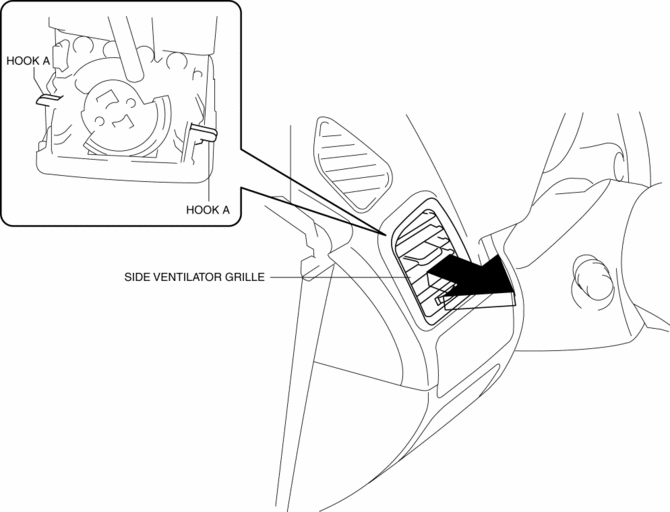
3. Insert your hand from the area where the switch panel was installed, remove the side ventilator grille in the direction of the arrow shown in the figure while detaching hooks A.
4. Install in the reverse order of removal.
Passenger-side
1. Disconnect the negative battery cable..
2. Open the glove compartment.
3. Remove the glove compartment..
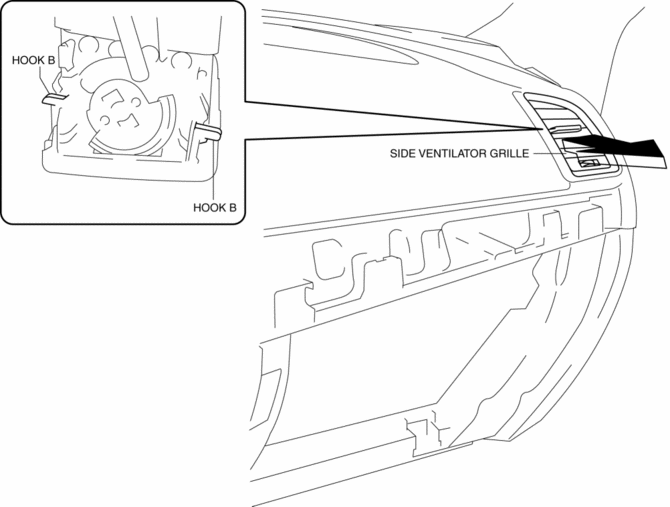
4. Insert your hand from the area where the glove compartment was installed, remove the side ventilator grille in the direction of the arrow shown in the figure while detaching hooks B.
5. Install in the reverse order of removal.
Center Ventilator Grille
1. Disconnect the negative battery cable..
2. Remove the decoration panel..
3. Push the edge of center ventilator grille in the direction of arrow (1) and detach hooks C.
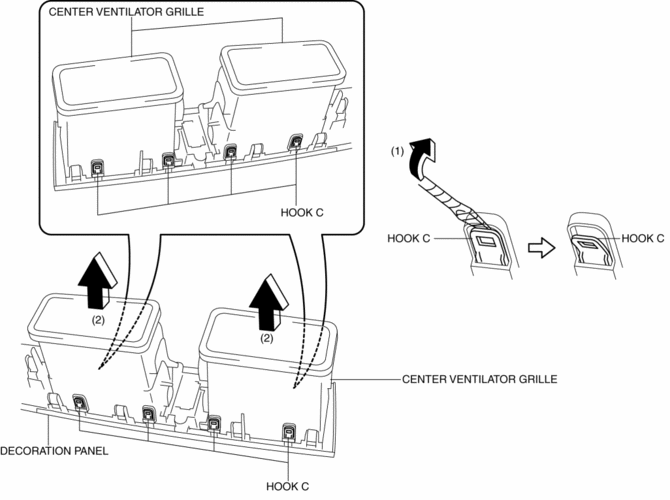
4. Remove the center ventilator grille in the direction of arrow (2) shown in the figure.
5. Install in the reverse order of removal.
 Upper Cowl Side Reinforcement Removal [Panel Replacement]
Symbol Mark
Removal Procedure
1. Drill the 13 locations indicated by (A) shown in the figure.
2. Drill the 8 locations indicated by (B) shown in the figure.
NOTE:
When a drill the 8 ...
 Frame
Frame
...
Other materials:
Oil Cooler Removal/Installation
WARNING:
Hot engines and engine oil can cause severe burns. Turn off the engine and
wait until it and the engine oil have cooled.
A vehicle that is lifted but not securely supported on safety stands is dangerous.
It can slip or fall, causing death or serious injury. Never work ...
Side Air Bag Module [Standard Deployment Control System]
Purpose
When a side air bag module receives an impact from a lateral collision, the
operation (deployment) of the air bag mediates the impact to the chest, stomach,
and waist of the driver and front passenger.
Function
When a side air bag module receives an impact from a la ...
Differential Oil Temperature Sensor
Purpose, Function
The differential oil temperature sensor detects the rear differential oil
temperature based on the resistance of the thermistor, and inputs it to the
AWD CM.
Construction
The differential oil temperature sensor is installed in the rear differential
carr ...
