
Mazda CX-5 Service & Repair Manual: Turn Light System
Purpose
-
The turn light system flashes the turn light three times automatically according to the turn switch operation.
-
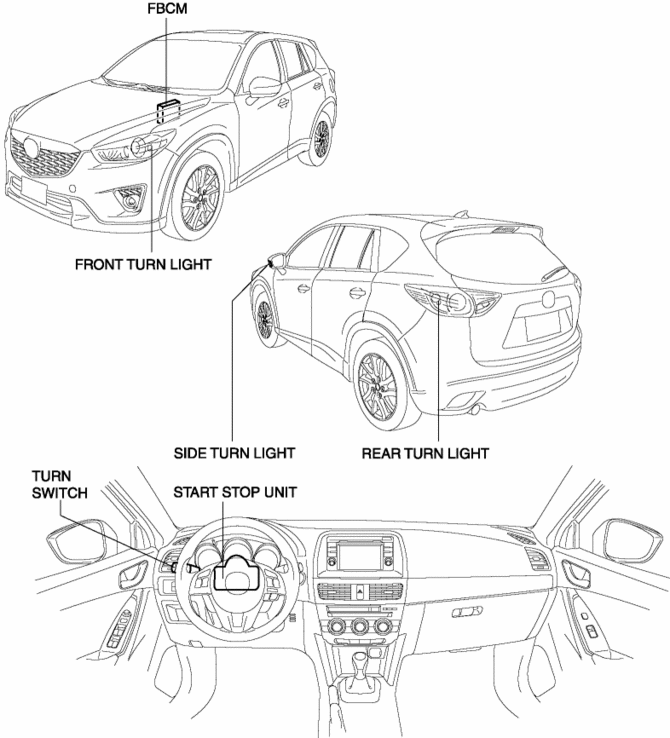
The front body control module (FBCM) performs turn light system fail-safe..
Function
-
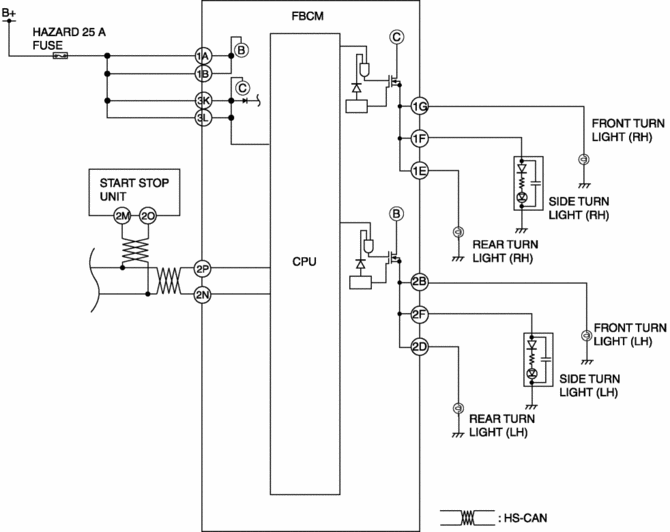
The front body control module (FBCM) performs control based on the turn switch (RH or LH) signal sent from the start stop unit via the CAN signal as follows:
-
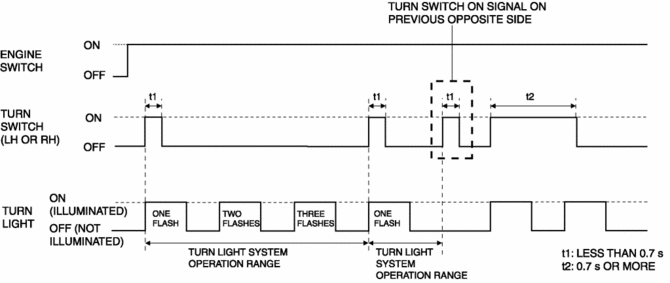
On-signal receive time of turn switch is less than 0.7 s: Operates the turn light system.
-
On-signal receive time of turn switch is 0.7 s or more: Flashes the turn light according to the receive time.
Structural view
System wiring diagram
Operation
-
If the front body control module (FBCM) receives the turn switch on signal from the start stop unit for less than 0.7 s when the ignition is switched ON (engine off or on), it flashes the turn light three times.
-
If the front body control module (FBCM) receives the turn switch on signal from the previous opposite side during the turn light system operation, it stop the turn light system operation. In addition, if the turn switch on signal on the opposite side is less than 0.7 s, the turn light system does not operate.
 Side Turn Light Removal/Installation
1. Disconnect the negative battery cable..
2. Remove the following parts:
a. Outer mirror glass.
b. Upper outer mirror garnish.
3. Remove the screws.
4. Disconnect the connector.
5. Re ...
 Vanity Mirror Illumination Inspection
1. Disconnect the negative battery cable..
2. Remove the sunvisor..
3. Verify that the continuity between the vanity mirror illumination terminals
is as indicated in the table.
I ...
Other materials:
Speedometer
Purpose
The speedometer notifies the driver of the speed at which the vehicle is
traveling.
Function
The instrument cluster controls the speedometer needle based on the vehicle
speed signal from the PCM and displays the current vehicle speed.
Construction
An an ...
Crankshaft Position (CKP) Sensor Removal/Installation
CAUTION:
When foreign material such as an iron chip is on the CKP sensor, it can cause
abnormal output from the sensor because of flux turbulence and adversely affect
the engine control. Be sure there is no foreign material on the CKP sensor when
replacing.
Do not assemble t ...
Not P Position Switch Inspection
NOTE:
The not P position switch is built into the selector lever component.
1. Disconnect the negative battery cable..
2. Remove the front console..
3. Disconnect the selector lever component connector.
4. Verify that the continuity between selector lever component terminals ...
