
Mazda CX-5 Service & Repair Manual: Torque Box Removal [Panel Replacement]
Symbol Mark

Removal Procedure
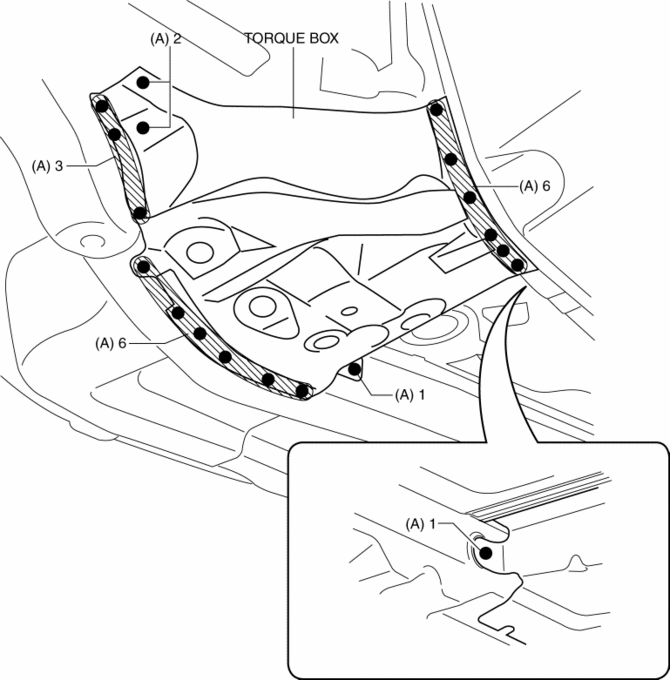
1. Drill the 19 locations indicated by (A) shown in the figure.
NOTE:
-
When drilling the 19 locations indicated by (A) shown in the figure, do not drill a hole all the way through or there could be a problem when installing the new part.
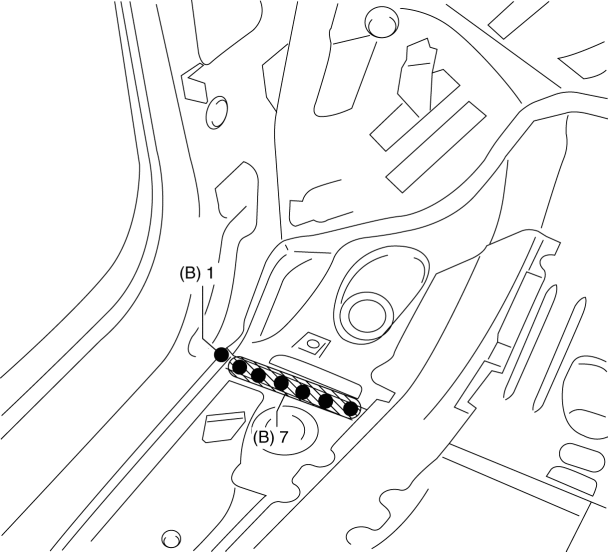
2. Drill the 8 locations indicated by (B) from the inside shown in the figure.
3. Remove the torque box.
 Torque Box Installation [Panel Replacement]
Symbol Mark
Installation Procedure
1. When installing new parts, measure and adjust the body as necessary to conform
with standard dimensions.
2. Drill holes for the plug welding before inst ...
 Ultra High Tension Steel [Construction]
Characteristics of Ultra High-Tensile Steel Plates
Ultra high-tensile steel plates have enhanced tensile strength compared to
previous high-tensile steel plates.
Because the stre ...
Other materials:
Glass Antenna
Purpose, Function
The RDS (Radio Data System) converts radio broadcast waves to electric signals
and sends the signals to the audio unit.
Construction
An antenna with excellent noise resistance has been adopted to the rear window
glass.
Fail-safe
Function n ...
Active Command Modes Inspection [Blind Spot Monitoring (Bsm)]
1. Connect the M-MDS to the DLC-2.
2. After the vehicle is identified, select the following items from the initialization
screen of the M-MDS.
a. Select “DataLogger”.
b. Select “Modules”.
c. Select “BSML” or “BSMR”.
3. Select the simulation items from the PID table.
4. ...
Power Steering Malfunction Indicator Light
Purpose
The power steering malfunction indicator light warns the driver that there
is a malfunction with the electric power steering (EPS) system.
Function
If there is a malfunction in the EPS system, the power steering malfunction
indicator light illuminates.
If th ...
