
Mazda CX-5 Service & Repair Manual: Steering Gear And Linkage Inspection
1. Remove the steering gear and linkage..
2. Remove the tie-rod end and boot..
3. Measure the rotation torque of the pinion shaft using a crescent wrench and pull scale. (speed measurement reference 5 В°/s
)
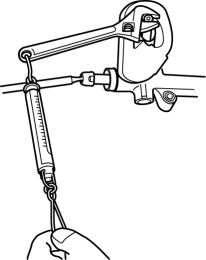
a. Install the crescent wrench to the steering gear.
b. Measure the length from the pinion shaft center to the crescent wrench end (application point of pull scale) as shown in the figure. This is dimension A.
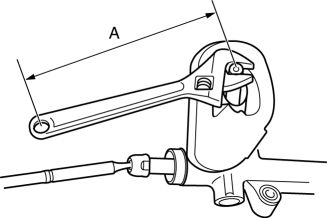
c. The rotation torque of the pinion shaft can be calculated using the following formula Measured value using pull scale (N {kgf, lbf}) = rotation torque of the pinion shaft (NВ·m {kgfВ·cm, inВ·lbf})/length A (m {cm, in})
-
Pinion shaft rotation torque (center of rack В± 180В°)
-
1.0—1.6 N·m {11—16 kgf·cm, 8.9—14 in·lbf} [Pull scale reading: 1.0—1.6 N·m {11—16 kgf·cm, 8.9—14 in·lbf}/A (m {cm, in})]
-
If not within the specification, replace the steering gear..
 Steering Gear And Linkage Disassembly
CAUTION:
To prevent damage to the steering gear, secure it to the vise using a copper
plate or clean cloth.
1. Disassemble in the order indicated in the figure.
1
...
 Steering Gear And Linkage Removal/Installation
CAUTION:
Performing the following procedures without first removing the ABS wheel-speed
sensor may possibly cause an open circuit in the wiring harness if it is pulled
by mistake. Before ...
Other materials:
Center-Rear Position Seat Belt
Before using the center-rear lap/shoulder belt make sure tongue (A) and anchor
buckle (B) are fastened.
Fastening the Seat Belt
1. Grasp the seat belt tongue (C).
2. Slowly pull out the lap/shoulder belt.
3. Insert the seat belt tongue (C) into the seat belt buckle (D) until you hear
a cli ...
Anticorrosion, Sound Insulation, And Vibration Insulation
Body Sealing
Apply body sealer where necessary.
For locations where application of body sealer is difficult after installation,
apply it before installation.
Application of Undercoating
Apply an undercoat to the required location of the body.
Application ...
Rear Stabilizer Removal/Installation [Awd]
WARNING:
Verify that the rear crossmember is securely supported by a jack. If the
rear crossmember falls off, it can cause serious injury or death, and damage
to the vehicle.
CAUTION:
Performing the following procedures without first removing the rear ABS wheel-speed
s ...
