
Mazda CX-5 Service & Repair Manual: Rear Heat Duct Removal/Installation
1. Disconnect the negative battery cable..
2. Remove the following parts:
a. Decoration panel.
b. Shift lever knob (MTX).
c. Front console box.
d. Shift panel.
e. Upper panel.
f. Rear console.
g. Side wall.
h. Front console.
i. Front scuff plate.
j. Front side trim.
k. Joint cover.
3. Turn the floor covering over.
4. Remove in the order indicated in the table.
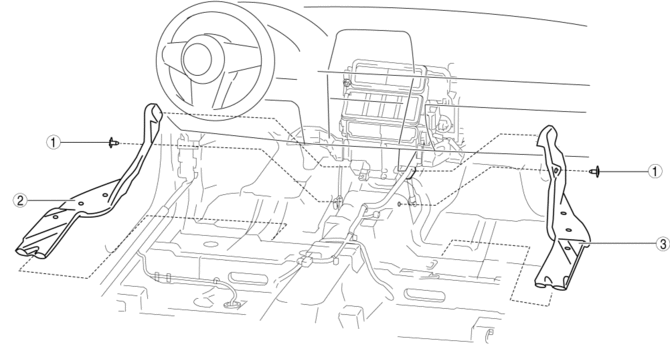
|
1 |
Fastener |
|
2 |
Rear heat duct (1) |
|
3 |
Rear heat duct (2) |
5. Install in the reverse order of removal.
 Heater Hose Removal/Installation
With Water Temperature Sensor
1. Remove the battery..
2. Drain the engine coolant..
3. Remove the insulator.
4. Remove the clips and remove the heater hose.
5. Remove the heat ...
 Rear Window Defroster/Outer Mirror Heater
Outline
Fogging is cleared from the rear window and outer mirror glass by heating
of the filament.
Structural view
System wiring diagram
Vehicles with full-auto air conditioner s ...
Other materials:
Generator [Skyactiv G 2.0]
Purpose, Function
The generator operates by obtaining drive force from the engine via the drive
belt and generates the required electricity for electronic devices.
Construction
The generator is installed on the engine left front side.
Output control is perfor ...
Oil Cooler Removal/Installation [Fw6 A EL, Fw6 Ax EL]
1. Disconnect the negative battery cable..
2. Remove the front under cover No.2..
3. Drain the ATF..
4. Drain the engine coolant..
5. Remove in the order indicated in the table.
1
Water hose (connected to the water pipe)
2
Water hose ...
Shift Solenoid No.1 [Fw6 A EL, Fw6 Ax EL]
Purpose/Function
Shift solenoid No.1 adjusts the hydraulic pressure in the low clutch circuit
based on the current demand from the TCM according to the vehicle conditions.
Construction
Shift solenoid No.1 is installed to the solenoid control valve body.
Shift solenoid ...
