
Mazda CX-5 Service & Repair Manual: Rear Drive Shaft Removal/Installation
CAUTION:
-
Performing the following procedures without first removing the ABS wheel?speed sensor may possibly cause an open circuit in the harness if it is pulled by mistake. Before performing the following procedures, remove the ABS wheel?speed sensor (wheel side) and fix it to an appropriate place where the sensor will not be pulled by mistake while the vehicle is being serviced.
1. Drain the rear differential oil into a container..
2. Remove in the order indicated in the table.
3. Install in the reverse order of removal.
4. After installation, add the specified rear differential oil..
5. Inspect the rear wheel alignment and adjust it if necessary..
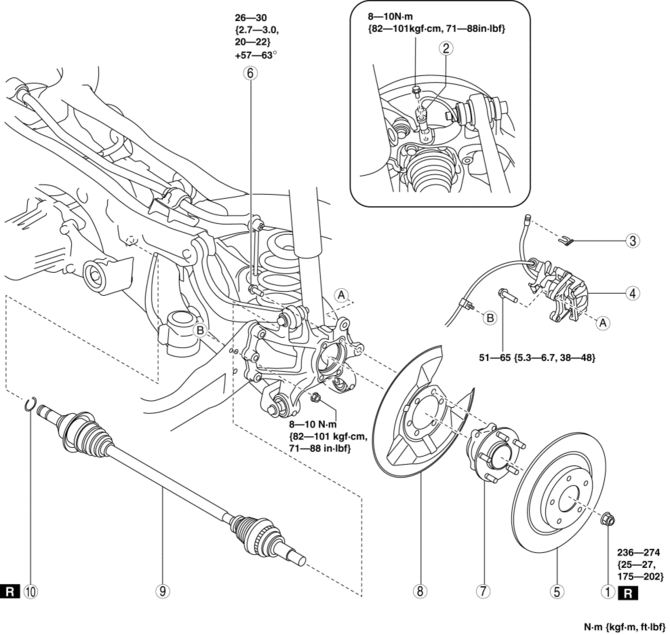
|
1 |
Locknut (See Locknut Installation Note.) |
|
2 |
ABS wheel-speed sensor . |
|
3 |
Brake hose clip |
|
4 |
Brake caliper component |
|
5 |
Disc plate |
|
6 |
Bolt (wheel hub) (See WHEEL HUB COMPONENT REMOVAL/INSTALLATION [2WD].) |
|
7 |
Wheel hub (See Wheel Hub Removal Note.) |
|
8 |
Dust cover |
|
9 |
Rear drive shaft (See Rear Drive Shaft Removal Note.) |
|
10 |
Clip (See Clip Installation Note.) |
Wheel Hub Removal Note
1. Before removing the wheel hub, place alignment marks on the wheel hub and the hub support so that they can be installed to the same position before removal.
2. Remove the wheel hub.
CAUTION:
-
Be careful not to damage the rear differential oil seal.
-
Be careful not to damage the drive shaft boots and ABS sensor rotor.
Rear Drive Shaft Removal Note
1. Pull the drive shaft toward the wheel side, then remove the drive shaft.
Clip Installation Note
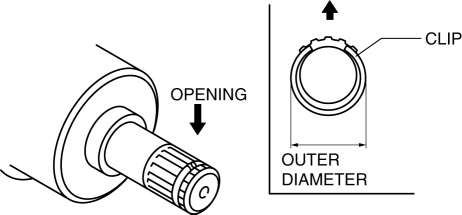
1. Install a new clip onto the joint shaft with the opening facing upward. Ensure that the diameter of the clip does not exceed the specification on installation.
2. After installation, measure the outer diameter. If it exceeds the specification, repeat Steps 1—2 using a new clip.
-
Clip outer diameter specification
-
25.2 mm {0.992 in} max.
Locknut Installation Note
1. After tightening the locknut once at a torque of 390 N·m {40 kgf·m, 288 ft·lbf}
, return it temporarily 180 degrees
, then retighten it to a torque of 236—274 N·m {25—27 kgf·m, 175—202 ft·lbf}
.
 Rear Drive Shaft Inspection
1. Inspect each connecting part for looseness.
Tighten or replace parts if necessary.
2. Inspect the dust boot on the drive shaft for cracks, damage, leaking grease,
and loosenes ...
 Rear Lateral Link Removal/Installation
1. Disconnect the rear stabilizer control link lower side nut..
2. Remove in the order indicated in the table.
3. Install in the reverse order of removal.
4. Inspect the wheel alignment an ...
Other materials:
Liftgate Light
Purpose
The liftgate lights are used to signal the following conditions to vehicles/people
at the rear.
Back-up lights: Signals that the vehicle is backing up.
Taillights: Signals the presence of the vehicle during nighttime.
Function
The back-up ...
Fuel Tank Inspection
WARNING:
Fuel is very flammable liquid. If fuel spills or leaks from the pressurized
fuel system, it will cause serious injury or death and facility breakage. Fuel
can also irritate skin and eyes. To prevent this, always complete the “Fuel
Line Safety Procedure”, while referring ...
Front Seat
Purpose, Function
The front seats are structured to reduce impact force applied to the head
of the occupant in a vehicle collision.
8WAY or 6WAY power seats have been adopted on the driver's seat. (with power
seat system).
A seat warmer system has been adopted on the ...
