
Mazda CX-5 Service & Repair Manual: Rear Lateral Link Removal/Installation
1. Disconnect the rear stabilizer control link lower side nut..
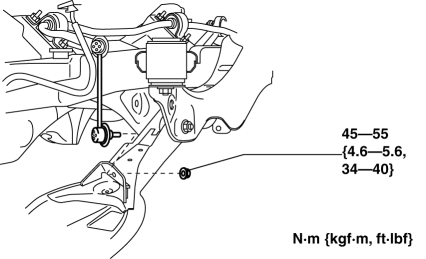
2. Remove in the order indicated in the table.
3. Install in the reverse order of removal.
4. Inspect the wheel alignment and adjust it if necessary..
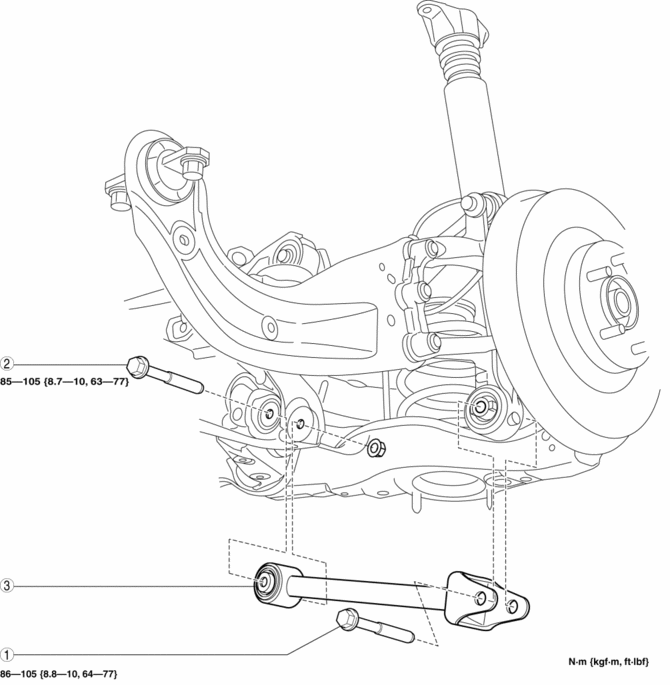
|
1 |
Rear lateral link outer bolt |
|
2 |
Rear lateral link inner bolt |
|
3 |
Rear lateral link (See Rear Lateral Link Removal Note.) (See Rear Lateral Link Installation Note.) |
Rear Lateral Link Removal Note
1. Jack up the vehicle to the unloaded condition, and support the axle component using a jack.
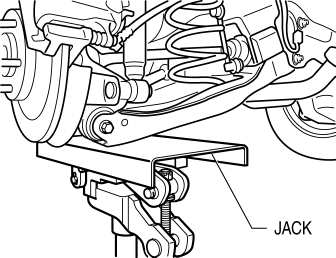
2. Remove the rear lateral link.
Rear Lateral Link Installation Note
1. Jack up the vehicle to the unloaded condition, and support the axle component using a jack.
2. Install the rear lateral link.
 Rear Drive Shaft Removal/Installation
CAUTION:
Performing the following procedures without first removing the ABS wheel?speed
sensor may possibly cause an open circuit in the harness if it is pulled by
mistake. Before perf ...
 Rear Lower Arm Removal/Installation
WARNING:
Be careful not to allow the coil spring to fly off when removing/installing
the coil spring. Otherwise, the coil spring could fly off and cause serious
injury or death, or dam ...
Other materials:
Negative Battery Cable Disconnection/Connection [Skyactiv G 2.0]
WARNING:
Before removing the SRS air bag system-related parts, always disconnect the
negative battery cable and wait for 1 min. or more to allow the back-up power
supply to deplete its stored power..
Required procedure after negative battery cable disconnection/connection
...
Drive Belt Removal/Installation [Skyactiv G 2.0]
WARNING:
A hot engine can cause severe burns. Turn off the engine and wait until it
is cool before servicing.
NOTE:
Remove/install the drive belt from the underside of the vehicle.
Generator Drive Belt Removal/Installation
CAUTION:
To prevent damage to the dri ...
Differential Oil Temperature Sensor
Purpose, Function
The differential oil temperature sensor detects the rear differential oil
temperature based on the resistance of the thermistor, and inputs it to the
AWD CM.
Construction
The differential oil temperature sensor is installed in the rear differential
carr ...
