
Mazda CX-5 Service & Repair Manual: Steering Switch
Purpose, Function
-
Operation of the audio system and change of the instrument cluster display can be changed are possible without a change in driving posture.
Construction
-
The steering switch is located on the spoke of the steering wheel.
-
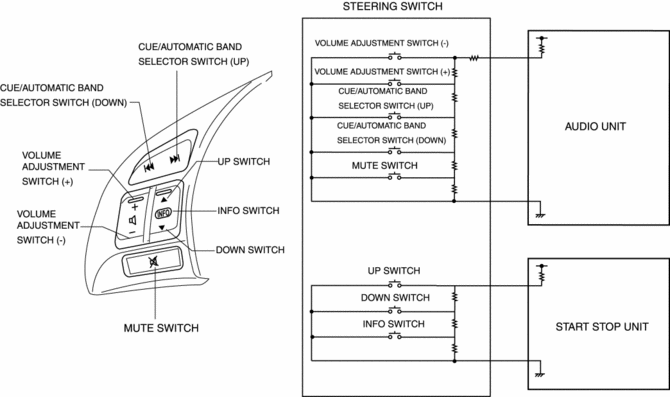
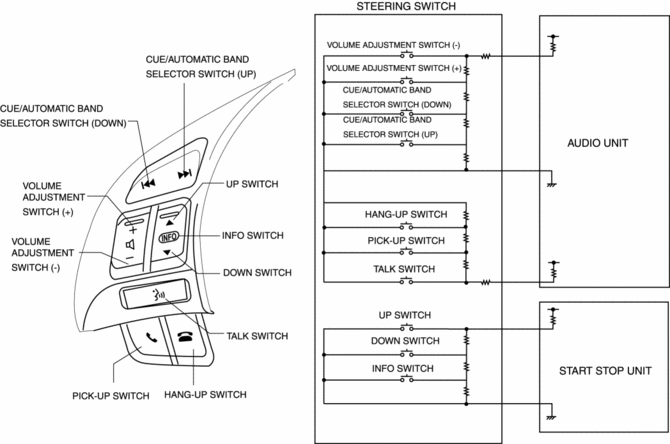
The resistance is built into each switch.
Without Bluetooth system
-
The steering switch consists of a volume adjustment (+) or (-) switch, cue/automatic band selector (up) or (down) switch, INFO switch, up switch, down switch, and mute switch.
With Bluetooth system
-
The steering switch consists of a volume adjustment (+) or (-) switch, cue/automatic band selector (up) or (down) switch, INFO switch, up switch, down switch, TALK switch, PICK-UP switch, and HANG-UP switch.
Operation
|
Switch name |
Operation |
|
Volume adjustment switch |
Audio volume can be adjusted. |
|
Cue/Automatic band selector switch |
Cue of CD tracks and selection of radio band are possible. |
|
Mute switch (Without Bluetooth system) |
Audio volume can be muted. Pressing again after muting returns to previous volume level. |
|
INFO switch |
Instrument cluster display can be changed. Refer to LIQUID CRYSTAL DISPLAY (LCD) for display content. |
|
Up/down switch |
Instrument cluster display can be changed. Refer to LIQUID CRYSTAL DISPLAY (LCD) for display content. |
|
TALK switch (With Bluetooth system) |
Launches the Bluetooth system. |
|
Pick-up switch (With Bluetooth system) |
Receives a phone call. |
|
Hang-up switch (With Bluetooth system) |
Hangs up a phone call. |
Fail-safe
-
Function not equipped.
 Steering SST
49 T028 3A0
Ball joint puller set
49 T025 001
Boot clamp crimpers
49 B032 317
Bearing & oil seal remover
...
 Steering Switch Inspection
Without Bluetooth system
WARNING:
Handling the driver-side air bag module improperly can accidentally operate
(deploy) the air bag module, which may seriously injure you. Read the service ...
Other materials:
Oil Filter Replacement
WARNING:
Hot engines and engine oil can cause severe burns. Turn off the engine and
wait until it and the engine oil have cooled.
A vehicle that is lifted but not securely supported on safety stands is dangerous.
It can slip or fall, causing death or serious injury. Never work ...
Ignition Coil [Skyactiv G 2.0]
Purpose, Function
The ignition coil generates high voltage by electromagnetic induction to
discharge the spark plug.
Construction
The ignition coil is installed to the upper part of the spark plug (direct
ignition coil).
With the adoption of the direct ignitio ...
Drive By Wire Control
Outline
Calculates the optimum target throttle valve opening angle at all engine
speeds and controls the throttle valve actuator.
The drive-by-wire control is composed of the idle air control, accelerator
control, traction control, excess engine speed control, overspeed control, ...
