
Mazda CX-5 Service & Repair Manual: Rear Brake (Disc) Removal/Installation
1. Loosen the adjusting nut..
2. Remove in the order indicated in the table.
3. Install in the reverse order of removal.
4. After installation, add brake fluid, bleed the air, and inspect for fluid leakage..
5. Pump the brake pedal a few times and inspect the following:
-
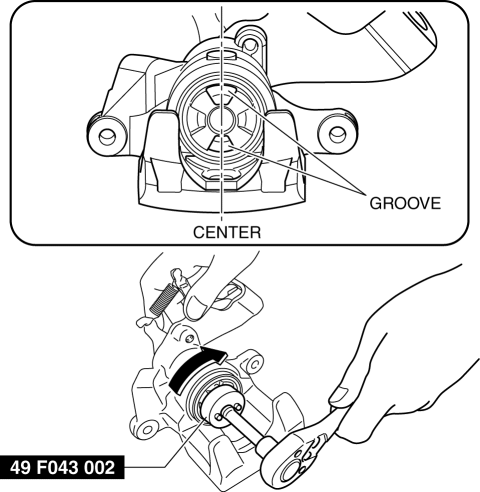
The disc pad projection is securely installed to the piston groove
-
Parking brake lever stroke
-
Brake drag
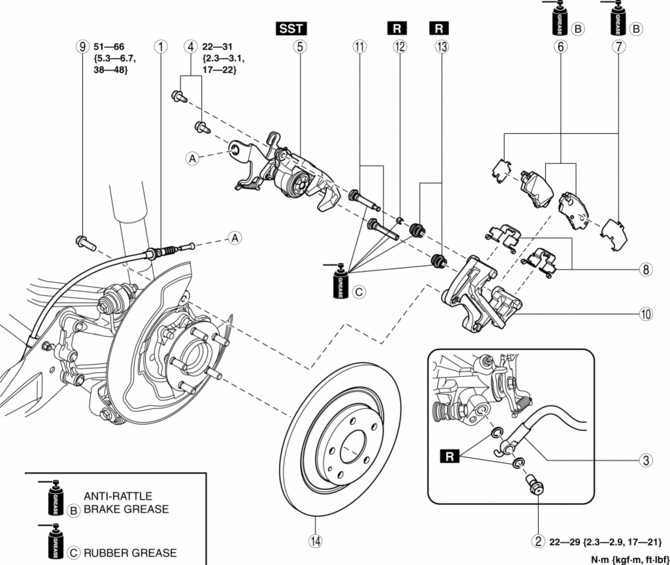
|
1 |
Rear parking brake cable (See Rear Parking Brake Cable Installation Note.) |
|
2 |
Bolt |
|
3 |
Brake hose |
|
4 |
Bolt |
|
5 |
Caliper (See Caliper Installation Note.) |
|
6 |
Disc pad |
|
7 |
Shim |
|
8 |
Guide plate |
|
9 |
Bolt |
|
10 |
Mounting support |
|
11 |
Slide pin |
|
12 |
Bushing |
|
13 |
Dust boot |
|
14 |
Disc plate |
Caliper Installation Note
1. Clean the exposed area of the piston.
2. Rotate the piston clockwise slowly using the SST and push the piston completely until the piston grooves are in the position shown in the figure.
3. Install the caliper.
Rear Parking Brake Cable Installation Note
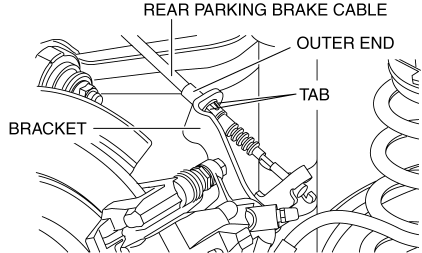
1. Install the rear parking brake cable to the rear caliper.
2. Verify that the outer end tabs of the rear parking brake cable is securely engaged with the bracket.
 Rear Brake (Disc) Inspection
Brake Judder Repair Hints
Description
1. Brake judder concern has the following 3 characteristics:
Steering wheel vibration
1. The steering wheel vibrates in the rotation direction. This characte ...
 Parking Brake
...
Other materials:
Keyless Antenna Removal/Installation
With Advanced Keyless Entry System
Vehicle interior, front
1. Disconnect the negative battery cable..
2. Remove the following parts:
a. Decoration panel.
b. Shift lever knob (MTX).
c. Front console box.
d. Shift panel.
e. Upper panel.
f. Rear console.
g. Side wall.
h. Front conso ...
Bsm Indicator Light Flashes While Not Under Bsm Indicator Light Flashing Conditions
(No Combination Switch Operation (Turn Signal Switch)) [Blind Spot Monitoring (Bsm)]
Description
BSM indicator light flashes while not under BSM indicator light-flashing
conditions (no combination switch operation (turn signal switch)
The BSM indicator light flashes despite not satisfying the BSM indicator
light flashing ...
Driveline/Axle SST
Front and Rear Axle
49 T028 3A0
Ball joint puller set
49 T028 301
Dust boot installer
49 U034 204
Dust boot installer
49 W032 310
Support block
—
— ...
