
Mazda CX-5 Service & Repair Manual: Quarter Window Glass Removal
1. Disconnect the negative battery cable..
2. Remove the following parts:
a. Trunk board.
b. Trunk end trim.
c. Rear scuff plate.
d. Trunk side trim.
e. D-pillar trim.
f. C-pillar trim.
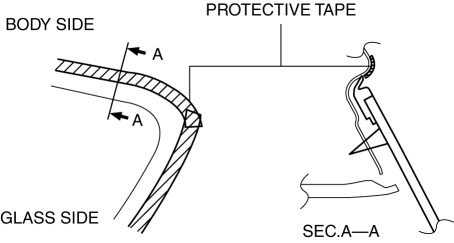
3. Apply protective tape along the edge of the body and the quarter window glass.
WARNING:
-
Using the piano wire with bare hands can cause injury. Always wear gloves when using the
piano wire.
4. Avoiding pins on the inside of the vehicle, insert the piano wire which has been cut to sufficient length.
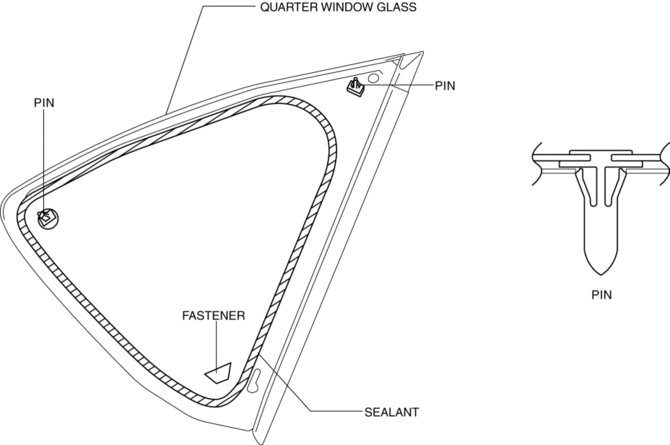
5. Wind each end of the piano wire around a bar.
NOTE:
-
Use a long sawing action to spread the work over the whole length of the piano wire to prevent it from breaking due to localized heating.
6. Secure one end of the piano wire, and while pulling the other end, cut the sealant around the quarter window glass.
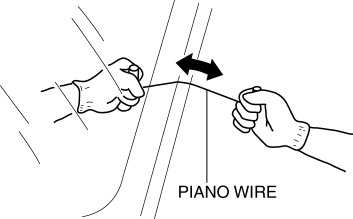
7. Pull the quarter window glass outward and detach the pins from the body.
8. If a pins or fastener is damaged, remove it.
NOTE:
-
Before removing the pins or spacers from the quarter window glass, place alignment marks on the quarter window glass.
 Quarter Window Glass Installation
WARNING:
Using a razor with bare hands can cause injury. Always wear gloves when using
a razor.
CAUTION:
If a door is opened or closed when all the window glass is closed, the ...
 Rear Door Glass Removal/Installation
1. Fully lower the rear door glass.
2. Disconnect the negative battery cable..
3. Remove the following parts:
a. Rear door trim.
b. Rear door quarter glass.
c. Rear door speaker.
d. Rear p ...
Other materials:
Vehicle Loading
This section will guide you in the proper loading of your vehicle and/or trailer,
to keep your loaded vehicle weight within its design rating capability, with or
without a trailer.
Properly loading your vehicle will provide maximum return of vehicle design performance.
Before loading your vehi ...
DSC HU/CM
Outline
A high reliability, reduced size and weight DSC HU/CM, integrating both the
DSC HU and the DSC CM, has been adopted.
DSC HU Part Purpose/Function
According to DSC CM signals, the DSC HU controls (on/off) each solenoid valve
and the pump motor, adjusts fluid pr ...
Wheel Hub Component Removal/Installation [Awd]
CAUTION:
Performing the following procedures without first removing the ABS wheel-speed
sensor may possibly cause an open circuit in the wiring harness if it is pulled
by mistake. Before performing the following procedures, disconnect the ABS wheel-speed
sensor connector (body side) ...
