
Mazda CX-5 Owners Manual: Floor Mat
WARNING
Make sure the floor mats are hooked on the retention pins to prevent them from bunching up under the foot pedals:
Using a floor mat that is not secured is dangerous as it will interfere with the accelerator and brake pedal operation, which could result in an accident.
Do not install two floor mats, one on top of the other, on the driver's side: Installing two floor mats, one on top of the other, on the driver's side is dangerous as the retention pins can only keep one floor mat from sliding forward.
In using a heavy duty floor mat for winter use always remove the original floor mat.
Loose floor mat(s) will interfere with the foot pedal and could result in an accident.
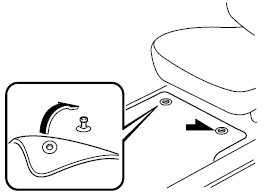
When setting a floor mat, position the floor mat so that its grommets are inserted over the pointed end of the retention posts.
 Hazardous Driving
WARNING
Be extremely careful if it is necessary to downshift on slippery surfaces: Downshifting
into lower gear while driving on slippery surfaces is dangerous. The sudden change
in tire speed co ...
 Rocking the Vehicle
WARNING
Do not spin the wheels at more than 56 km/h (35 mph), and do not allow anyone
to stand behind a wheel when pushing the vehicle: When the vehicle is stuck, spinning
the wheels at high spee ...
Other materials:
Auxiliary Jack/Usb Port Removal/Installation
1. Disconnect the negative battery cable..
2. Remove the upper console..
3. While pressing the auxiliary jack/USB port. tabs in the direction of the arrows
(1) shown in the figure, press the auxiliary jack/USB port. in the direction of
the arrow (2) to detach the auxiliary jack/USB port. tab ...
Hazard Warning Switch Removal/Installation
1. Disconnect the negative battery cable..
2. Remove the decoration panel..
3. While pressing the hazard warning switch tab in the direction of the arrow
(1) shown in the figure, press the hazard warning switch in the direction of the
arrow (2) shown in the figure to detach the hazard warnin ...
Service Cautions
Injury/damage Prevention Precautions
Depending on the vehicle, the cooling fan may operate suddenly even when
the ignition is switched to off. Therefore, keep hands and tools away from the
cooling fan even if the cooling fan is not operating to prevent injury to personnel
or damage t ...
