
Mazda CX-5 Service & Repair Manual: Rear Door Glass Removal/Installation
1. Fully lower the rear door glass.
2. Disconnect the negative battery cable..
3. Remove the following parts:
a. Rear door trim.
b. Rear door quarter glass.
c. Rear door speaker.
d. Rear power window motor.
4. Press the center of the service hole cover in the direction of arrow (1) shown in the figure.
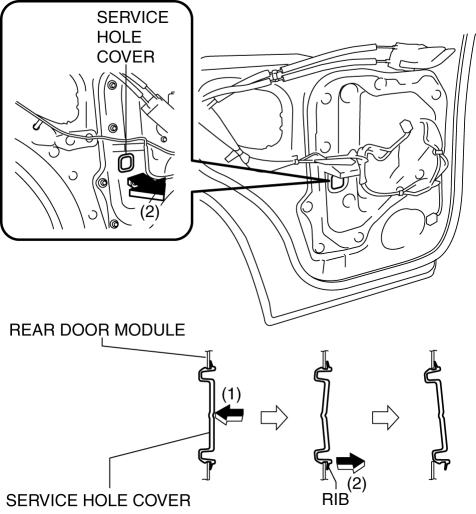
5. Remove the service hole cover by holding its rib and partially peeling it back in the direction of arrow (2) shown in the figure.
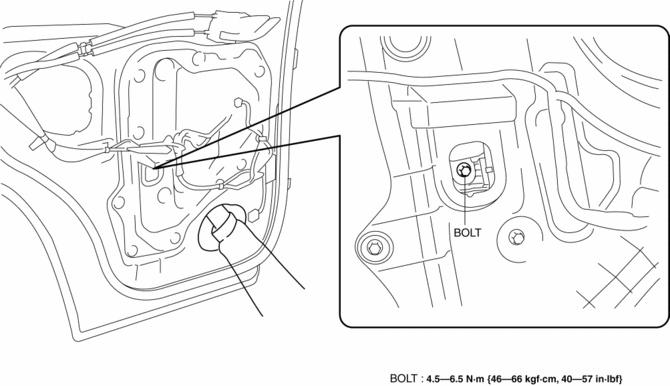
6. Remove the bolt.
CAUTION:
-
If the bolts are removed without supporting the rear door glass, the rear door glass may fall off and be damaged. Remove the bolts while inserting your hand into the rear door speaker installation hole to support the rear door glass.
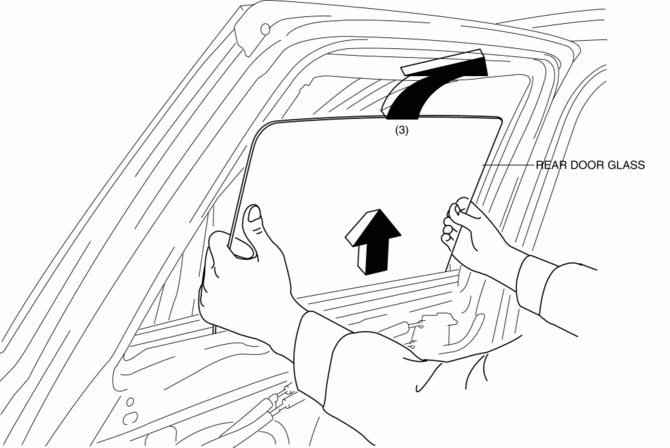
7. Lift the rear door glass up and remove while tilting it.
8. Lift up the rear door glass, tilt it in the direction of arrow (3) shown in the figure.
9. Install in the reverse order of removal.
 Quarter Window Glass Removal
1. Disconnect the negative battery cable..
2. Remove the following parts:
a. Trunk board.
b. Trunk end trim.
c. Rear scuff plate.
d. Trunk side trim.
e. D-pillar trim.
f. C-pillar trim. ...
 Rear Door Quarter Glass Removal/Installation
1. Fully lower the rear door glass.
2. Disconnect the negative battery cable..
3. Remove the rear door trim..
4. Remove the rear door weather strip arrow (1) shown in the figure.
5. Remove ...
Other materials:
Air Intake Actuator [Full Auto Air Conditioner]
Purpose
The air intake actuator moves the air intake door in the blower unit to switch
the air intake port.
Function
The air intake actuator drives the motor based on the signal from the climate
control unit and moves the air intake door to the FRESH or REC position.
...
How to Use This Manual
We want to help you get the most driving pleasure from your vehicle. Your owner's
manual, when read from cover to cover, can do that in many ways.
Illustrations complement the words of the manual to best explain how to enjoy
your Mazda. By reading your manual, you can find out about the fea ...
Overheating
Overheating
If the High engine coolant temperature warning light illuminates, the vehicle
loses power, or you hear a loud knocking or pinging noise, the engine is probably
too hot.
WARNING
Switch the ignition to off and make sure the fan is not running before attempting
to work near the c ...
