
Mazda CX-5 Service & Repair Manual: Oil Seal (Coupling Component) Replacement
1. Drain the differential oil into a container.
2. Remove the coupling component..
3. Remove the oil seal from the differential carrier using a screwdriver or similar tool.
4. Apply differential oil to the new oil seal lip.
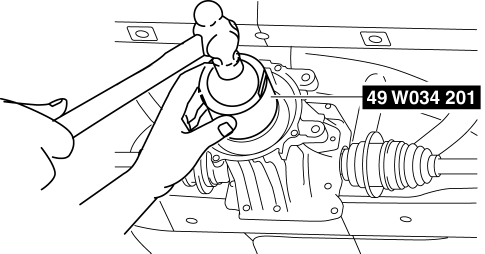
5. Install the new oil seal to the differential carrier using the SST
.
6. Install the coupling component..
7. Add the specified differential oil from the filler plug..
 Oil Seal (Control Valve Body) Replacement [Fw6 A EL, Fw6 Ax EL]
1. Disconnect the negative battery cable..
2. Remove the air cleaner component..
3. Disconnect the control valve body connector.
CAUTION:
Make sure that your hand does not touch the ...
 Oil Seal (Differential) Replacement [C66 M R]
1. Remove the front under cover No.2..
2. Drain the manual transaxle oil..
3. Disconnect the drive shaft (LH) from the MTX..
4. Disconnect the drive shaft (RH) from the MTX..
5. Remove the oil ...
Other materials:
Shift Solenoid No.4 [Fw6 A EL, Fw6 Ax EL]
Purpose/Function
Shift solenoid No.4 adjusts the hydraulic pressure in the high clutch circuit
and the low and reverse brake circuit based on the current demand from the TCM
according to the vehicle conditions.
Construction
Shift solenoid No.4 is installed to the solenoid c ...
Shroud Side Member Installation [Panel Replacement]
Symbol Mark
Installation Procedure
1. When installing new parts, measure and adjust the body as necessary to conform
with standard dimensions.
2. Drill holes for the plug welding before installing the new parts.
3. After temporarily installing new parts, make sure the related parts fit p ...
Headlight Auto Leveling System Initialization
NOTE:
The AFS control module records the vehicle height while it is unoccupied
by performing the headlight auto leveling system initial setting.
Perform headlight auto leveling system initial setting if any of the following
work is performed.
AFS control module rep ...
