
Mazda CX-5 Service & Repair Manual: Liftgate Upper Trim Removal/Installation
1. Take the shaded area shown in the figure, detach tab A while pulling the liftgate upper trim in the direction of the arrow (1) shown in the figure, then detach clips B, clip C and pin D while pulling in the direction of the arrow (2).
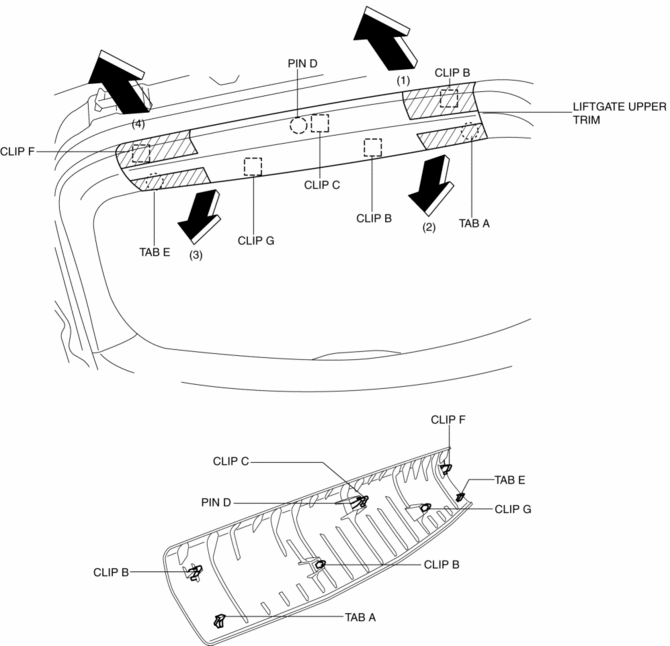
2. Take the shaded area shown in the figure, detach tab E while pulling the liftgate upper trim in the direction of the arrow (3) shown in the figure, then detach the clip F, clip G while pulling in the direction of the arrow (4).
3. Install in the reverse order of removal.
 Liftgate Side Trim Removal/Installation
1. Remove the liftgate upper trim..
2. Remove the fastener A.
3. Take the shaded area shown in the figure, and pull the liftgate side trim
in the direction of the arrow (1) while detaching clips ...
 Meter Hood Removal/Installation
1. Disconnect the negative battery cable..
2. Remove the upper column cover.
3. Using a phillips screwdriver, remove fasteners.
NOTE:
When pulling up the shaft of fasteners using a phill ...
Other materials:
Electrical Fan Control
Outline
Through cooling of the radiator and condenser by operation of the cooling
fan according to vehicle conditions, engine reliability and cooling performance
have been improved.
Block Diagram
Operation
The PCM determines the demand airflow volume by the following c ...
Seat
Outline
Front seat
A manual seat or power seat has been adopted on the driver's seat.
A seat warmer system has been adopted on the front seats. (with seat warmer
system)
A manual seat has been adopted on the front passenger's seat.
A side air bag module is ...
Headlight High Beam Indicator Light
Purpose
Notifies the user that the headlights (HI) are illuminated.
Function
Illuminates when the headlight (HI) or parking illumination conditions are
met.
Construction
Displayed in the instrument cluster.
Operation
1. When the light switch is operat ...
