
Mazda CX-5 Service & Repair Manual: Blind Spot Monitoring (Bsm) Control Module Removal/Installation
1. Disconnect the negative battery cable..
2. Remove the rear combination light..
3. Remove the rear bumper..
4. Disconnect the connector.
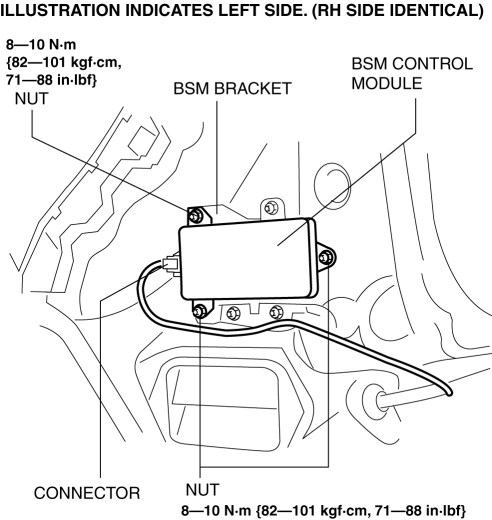
5. Remove the nuts.
6. Remove the BSM control module.
7. Install in the reverse order of removal.
8. Perform the BSM radar test..
CAUTION:
-
If the BSM control module is replaced, not performing the BSM radar test will cause a deviation in the radar emission angle which could result in the system not detecting a vehicle approaching from the rear correctly. If the BSM control module is replaced, perform the BSM radar test.
 Blind Spot Monitoring (Bsm) Control Module Inspection
1. Disconnect the negative battery cable..
2. Remove the rear combination light..
3. Remove the rear bumper..
4. Connect the negative battery cable..
5. Verify that the voltages of each of the ...
 Blind Spot Monitoring (Bsm) Off Indicator Light
Purpose
The BSM OFF indicator light informs the driver that the Blind Spot Monitoring
(BSM) system is turned off or there is a malfunction in the system.
Function
The instrument ...
Other materials:
Remote Transmitter Battery Voltage Inspection
NOTE:
Because the remote transmitter battery power cannot be determined using the
battery itself, determine by the remote transmitter battery low warning operation
conditions.
Operation procedure for remote transmitter battery low warning
1. Place the remote transmitter inside t ...
Accelerator Pedal, Kickdown Switch [Skyactiv G 2.0]
Purpose, Function
The driver's intentions are transmitted to the PCM via the accelerator pedal.
Kickdown switch (ATX) (Applied VIN (assumed): JM3 KE2*E*D# 148107?)
If the accelerator pedal is depressed carelessly, kickdown control will be
implemented based on the accelera ...
A/C Cut Off Control [Skyactiv G 2.0]
Outline
Controls the A/C operation by switching the A/C relay ON/OFF at the optimal
timing according to engine operation conditions. Acceleration performance and
A/C compressor reliability have been improved by controlling the A/C operation.
Block Diagram
Operation
The ...
