
Mazda CX-5 Service & Repair Manual: Auto Light Off System
Purpose
-
The auto light-Off system turns off the TNS or headlights automatically.
-
The front body control module (FBCM) performs auto light-Off system fail-safe..
Function
-
The auto light-Off system controls the front body control module (FBCM).
-
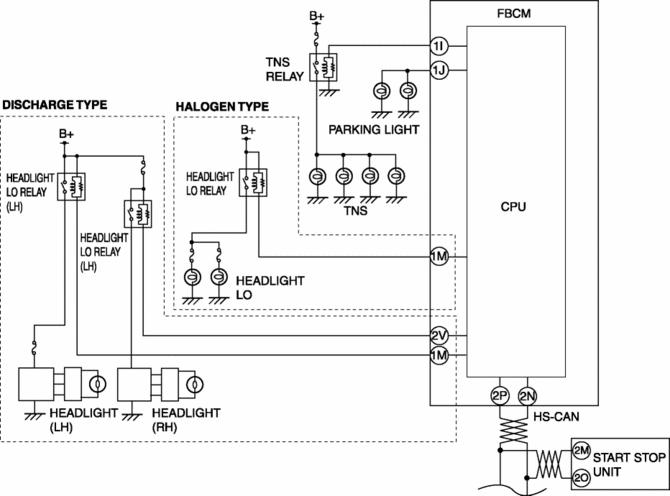
The front body control module (FBCM) controls the auto light-Off system based on the following signals and conditions:
-
IG power supply condition
-
TNS or headlight illumination condition
-
Light switch signal sent from start stop unit via CAN signal
-
If the front body control module (FBCM) detects that the ignition is switched off when the TNS and headlights are turned on, the TNS and headlights are turned on for a certain period of time and turned off after a certain period of time has elapsed.
-
A personalization feature has been adopted which can change the illumination time of the TNS or headlights. For details on the personalization features, refer to LIGHTING SYSTEM PERSONALIZATION.
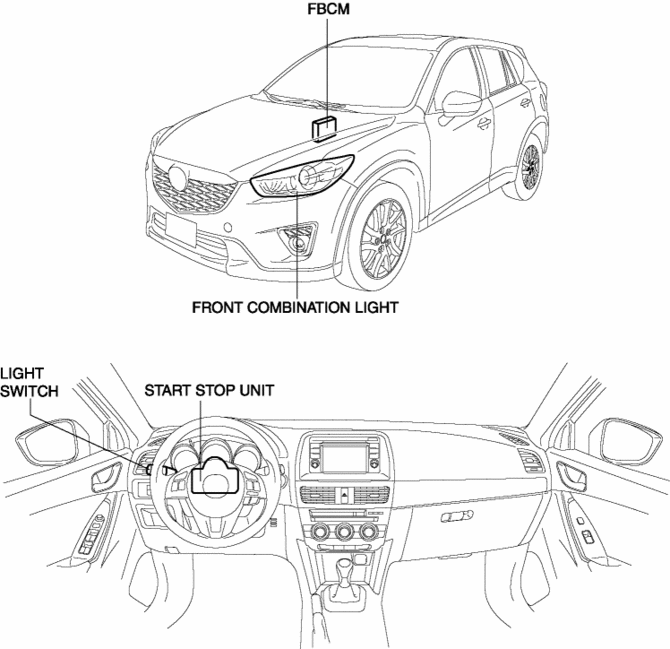
Structural view
System wiring diagram
Operation
-
If the front body control module (FBCM) detects that the ignition is switched off when the light switch is in the TNS/HEAD/AUTO position and the headlights are turned on, the TNS or headlights are turned on for 30 s*1 and turned off after 30 s.
-
If the front body control module (FBCM) receives the light switch signal from the start stop unit during the auto light-Off system operation, the headlight is controlled as follows:
-
Light switch switches to TNS/HEAD signal: Illuminates the light for 30 s after receiving the signal.
-
Light switch switches to OFF/AUTO signal: Turns off the light when receiving the signal.
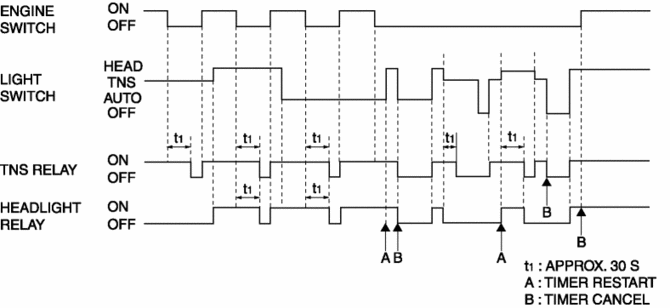
*1 The illumination time can be changed by personalization. For details on the personalization, refer to LIGHTING SYSTEM PERSONALIZATION.
 Auto Leveling Sensor Removal/Installation
1. Disconnect the negative battery cable..
2. Disconnect the connector.
3. Remove the bolts.
4. Remove the auto leveling sensor.
5. Install in the reverse order of removal.
6. Pe ...
 Auto Light System
Outline
The auto light system automatically turns the TNS and headlights on/off according
to the illumination level above and in front of the vehicle.
The auto light system is contro ...
Other materials:
Fuel Line Pressure Inspection
WARNING:
Fuel line spills and leakage from the pressurized fuel system are dangerous.
Fuel can ignite and cause serious injury or death and damage. To prevent this,
complete the following inspection with the engine stopped.
Fuel is very flammable liquid. If fuel spills or leaks ...
Power Seat System
Outline
The power seat system drives the electric motor, operates the front seat
safely, and changes the driving posture to suit the occupant by operating the
power seat switch.
8 way power seats or 6 way power seats have been adopted on the driver's
seat.
Function
...
Intake Manifold
Purpose, Function
Distributes intake air to each cylinder evenly.
Optimizes the combustion efficiency and performance of the engine by distributing
intake air to each cylinder.
Construction
The intake manifold is installed to the cylinder head.
...
