
Mazda CX-5 Service & Repair Manual: Key Cylinder Switch
Purpose
-
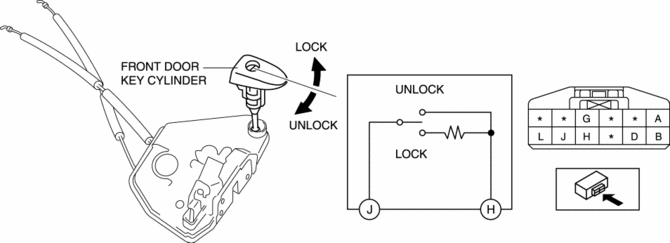
The switch turns on/off in conjunction with the front door key cylinder lock/unlock and the rear body control module (RBCM) detects the key cylinder operation condition by the change in the voltage.
Function
-
The key cylinder switch contact point changes in conjunction with the front door key cylinder lock/unlock operation.
Construction
-
Built into the driver's side front door latch and lock actuator.
-
The front door key cylinder is connected to the front door latch and lock actuator, and the front door key cylinder is rotated to directly switch the key cylinder switch.
-
When the front door key cylinder is not operated, the key cylinder switch is off (contact point: Open).
Operation
Lock operation
-
When the key is inserted in the front door key cylinder and it is rotated in the lock direction, the key cylinder switch switches to the lock side, and the lock-side switch turns on (contact point: Closed).
Unlock operation
-
When the key is inserted in the front door key cylinder and it is rotated in the unlock direction, the key cylinder switch switches to the unlock side, and the unlock-side switch turns on (contact point: Closed).
Fail-safe
-
Function not equipped.
 Front Door Key Cylinder Switch Inspection
1. Perform the front door glass preparation..
2. Disconnect the negative battery cable..
3. Remove the following parts:
a. Inner garnish.
b. Front door trim.
c. Front door key cylinder.
d. ...
 Storage
...
Other materials:
Windshield Washer Nozzle Removal/Installation
1. Remove the following parts:
a. Windshield wiper arm and blade.
b. Cowl grille.
2. Disconnect the windshield washer hose from the windshield washer nozzle..
3. While pressing windshield washer nozzle tabs in the direction of the arrow
(1) shown in the figure, pull the windshield washer ...
Tie Rod Inspection
1. Inspect for bending and damage.
If there is any malfunction, replace the tie rod.
2. Inspect for excessive play.
If there is any malfunction, replace the tie rod.
3. Swing the tie rod five times.
4. Measure the swing torque of the tie rod using a pull scale.
...
Clutch Pipe And Hose Removal/Installation [C66 M R]
CAUTION:
Do not allow clutch fluid to get on a painted surface. Clutch fluid contains
properties which can dissolve the paint. If clutch fluid gets on a painted surface,
wash it off with water immediately and wipe the area off completely.
1. Disconnect the negative battery cable. ...
