
Mazda CX-5 Service & Repair Manual: Rear Coil Spring Removal/Installation
WARNING:
-
Be careful not to allow the coil spring to fly off when removing/installing the coil spring. Otherwise, the coil spring could fly off and cause serious injury or death, or damage to the vehicle.
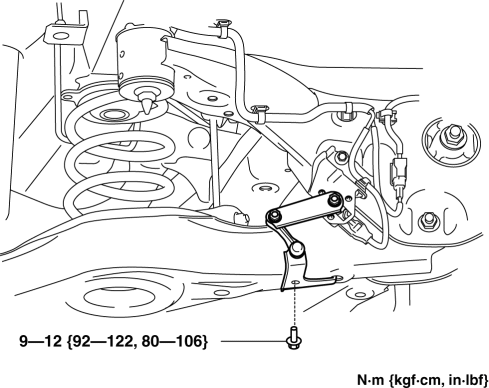
1. When working on the left side of the vehicle, disconnect the auto leveling sensor link..
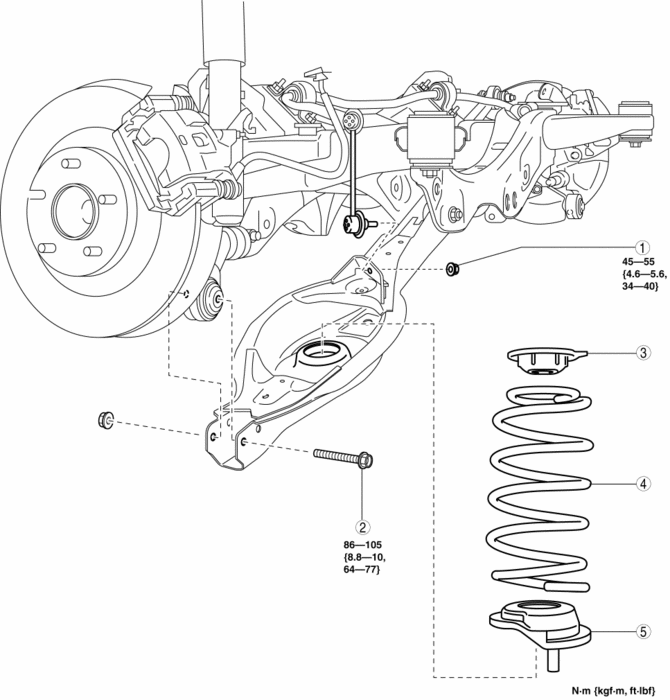
2. Remove in the order indicated in the table.
3. Install in the reverse order of removal.
4. Inspect the wheel alignment and adjust it if necessary..
|
1 |
Rear stabilizer control link lower side nut |
|
2 |
Rear lower arm outer bolt (See Rear Coil Spring Removal Note.) |
|
3 |
Upper spring seat rubber |
|
4 |
Rear coil spring (See Rear Coil Spring Installation Note.) |
|
5 |
Lower spring seat rubber |
Rear Coil Spring Removal Note
1. Support the rear lower arm using a jack.
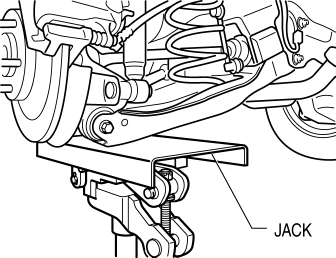
2. Remove the rear lower arm outer bolt.
3. Remove the rear coil spring.
Rear Coil Spring Installation Note
1. Position the jack under the rear lower arm and jack up slowly.
2. Install the rear coil spring so that the light green paint is pointed upward of the vehicle.
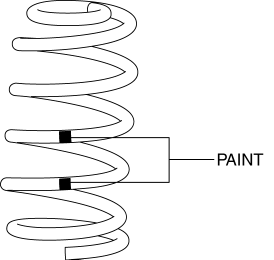
3. Align the upper end of the rear coil spring with the step of the upper spring seat rubber.
4. Align the lower end of the rear coil spring with the step of the lower spring seat rubber.
5. Install the rear lower arm outer bolt.
 Rear Axle
Purpose, Function
An angular ball bearing, with a low rotational resistance, has been adopted,
improving driveability.
A unit bearing that does not require pre-load setting has bee ...
 Rear Drive Shaft
Purpose, Function
Engine noise and vibration have been reduced due to adoption of a bell joint
on the wheel side of the constant velocity joint.
A low noise and vibration double of ...
Other materials:
Engine Mount
Purpose, Function
The engine mount secures the engine and transaxle to the vehicle body, reducing
vibration and noise.
Construction
The three points at the engine front (No.3 engine mount), one side of the
transaxle (No.1 engine mount), and the rear upper part of the transa ...
Evaporative Emission (Evap) Control System
Purpose, Outline
Prevents release of evaporative gas into the atmosphere.
The intake manifold vacuum introduces evaporative gas to the intake manifold
via the charcoal canister and the purge solenoid valve.
System Diagram
U.S.A. and CANADA
Except U.S.A. and CANADA
...
Manifold Absolute Pressure (Map) Sensor/Intake Air Temperature (Iat) Sensor
No.2 Removal/Installation
NOTE:
Because the IAT sensor No.2 is integrated in the MAP sensor, replacing the
IAT sensor No.2 includes replacement of the MAP sensor/IAT sensor No.2.
1. Disconnect the negative battery cable..
2. Disconnect the MAP sensor/IAT sensor No.2 connector.
3. Remove the MAP sensor/IA ...
