
Mazda CX-5 Service & Repair Manual: Inspection Of SST (Deployment Tool) [Two Step Deployment Control System]
1. Before using the SST
(49 H066 002), inspect its operation.
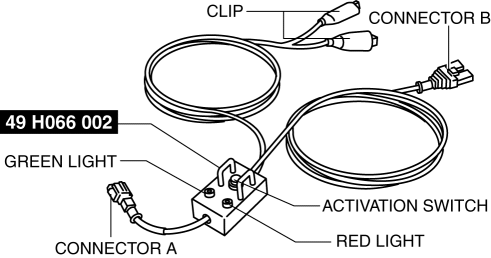
Inspection Procedure
1. Follow the steps below to inspect the SST
(49 H066 002).
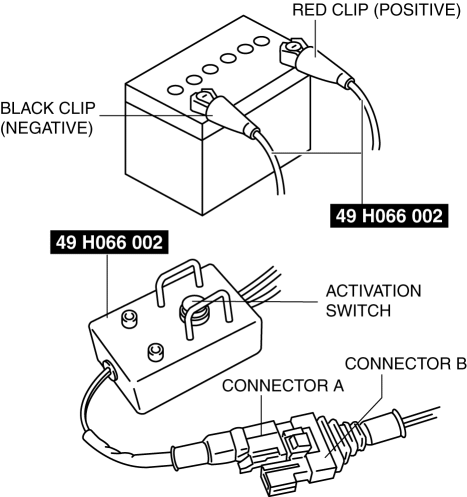
-
If not as indicated in the table, replace the SST
(49 H066 002) because it has a malfunction.
WARNING:
-
Do not use a malfunctioning SST (49 H066 002), otherwise it could cause the air bag module, pre-tensioner seat belt or lap pre-tensioner seat belt to accidentally operate (deploy).
CAUTION:
-
Because the permissible voltage for the SST (49 H066 002) is 12 V, do not connect a 24 V power source because it will damage the SST. Always connect only a 12 V power source.
|
Step |
Inspection procedure |
Light condition |
|
|
Green |
Red |
||
|
1 |
Connect the power supply red clip to the positive battery terminal, and the black clip to the negative battery terminal. |
On |
Off |
|
2 |
Connect connectors A and B. |
Off |
On |
|
3 |
Press the activation switch. |
On |
Off |
 Inspection Of SST (Deployment Tool) [Standard Deployment Control System]
1. Before using the SST (49 H066 002), inspect its operation.
Inspection Procedure
1. Follow the steps below to inspect the SST (49 H066 002).
If not as indicated in the table, repl ...
 Ion Sensor Inspection
DTC Inspection
1. Connect the M-MDS to the DLC?2.
2. Perform the DTC inspection using the M-MDS..
If any DTC related to the ignition coil/ion sensor is present, repair the
malfunctioning ...
Other materials:
Blind Spot Monitoring (BSM) System
Blind Spot Monitoring (BSM) System
The Blind Spot Monitoring (BSM) system is designed to assist the driver by monitoring
blind spots on both sides of the vehicle to the rear in certain situations such
as when changing lanes on roads and freeways.
The BSM system monitors the detection areas on ...
Keyless Antenna Removal/Installation
With Advanced Keyless Entry System
Vehicle interior, front
1. Disconnect the negative battery cable..
2. Remove the following parts:
a. Decoration panel.
b. Shift lever knob (MTX).
c. Front console box.
d. Shift panel.
e. Upper panel.
f. Rear console.
g. Side wall.
h. Front conso ...
Seat Belt
Fastening the Seat Belt
Position the lap belt as low as possible, not on the abdominal area, then adjust
the shoulder belt so that it fits snugly against your body.
Unfastening the Seat Belt
Depress the button on the seat belt buckle.
If the belt does not fully retract, pull it out and che ...
