
Mazda CX-5 Service & Repair Manual: Inspection Of SST (Deployment Tool) [Standard Deployment Control System]
1. Before using the SST
(49 H066 002), inspect its operation.
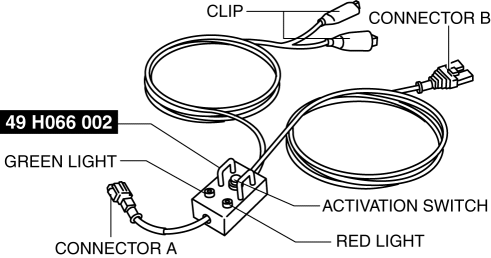
Inspection Procedure
1. Follow the steps below to inspect the SST
(49 H066 002).
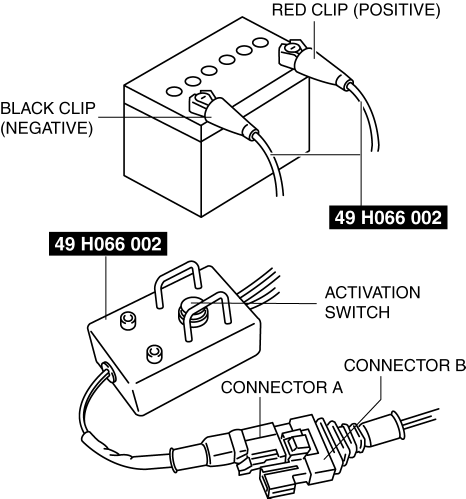
-
If not as indicated in the table, replace the SST
(49 H066 002) because it has a malfunction.
WARNING:
-
Do not use a malfunctioning SST (49 H066 002), otherwise it could cause the air bag module or pre-tensioner seat belt to accidentally operate (deploy).
CAUTION:
-
Because the permissible voltage for the SST (49 H066 002) is 12 V, do not connect a 24 V power source because it will damage the SST. Always connect only a 12 V power source.
|
Step |
Inspection procedure |
Light condition |
|
|
Green |
Red |
||
|
1 |
Connect the power supply red clip to the positive battery terminal, and the black clip to the negative battery terminal. |
On |
Off |
|
2 |
Connect connectors A and B. |
Off |
On |
|
3 |
Press the activation switch. |
On |
Off |
 Hydraulic Variable Valve Timing Control
Outline
Changes the exhaust valve timing according to engine operation conditions
to improve engine output, fuel economy, and emission performance.
Based on each input signal, the PC ...
 Inspection Of SST (Deployment Tool) [Two Step Deployment Control System]
1. Before using the SST (49 H066 002), inspect its operation.
Inspection Procedure
1. Follow the steps below to inspect the SST (49 H066 002).
If not as indicated in the table, repl ...
Other materials:
Start Stop Unit
Purpose
Performs control of several systems based on input/output signals from switches.
Function
The start stop unit controls systems based on the input/output signals.
The functions which are controlled are as follows:
Control Table
Control ...
Refrigerant Line Removal/Installation
1. Disconnect the negative battery cable..
2. Discharge the refrigerant..
3. Disconnect the engine ground.
4. Disconnect the refrigerant pressure sensor connector.
5. Remove in the order indicated in the table. Do not allow compressor oil to
spill.
CAUTION:
If moisture or for ...
Air Bag System Service Cautions [Two Step Deployment Control System]
Air Bag System Component Disassembly
Disassembling the air bag system components could cause it to not operate
(deploy) normally. Never disassemble any air bag system components.
Air Bag Module, Pre-tensioner Seat Belt, Lap Pre-tensioner Seat Belt Handling
Oil, grease, or ...
