
Mazda CX-5 Service & Repair Manual: Heated Oxygen Sensor (HO2 S) Inspection
HO2S Inspection
1. Connect the M-MDS to the DLC?2.
2. Switch the ignition ON (engine on).
3. Warm up the engine to normal operating temperature.
4. Access the following PIDs using the M-MDS..
-
VSS (Vehicle speed)
-
RPM (Engine speed)
-
O2S12 (HO2S output voltage)
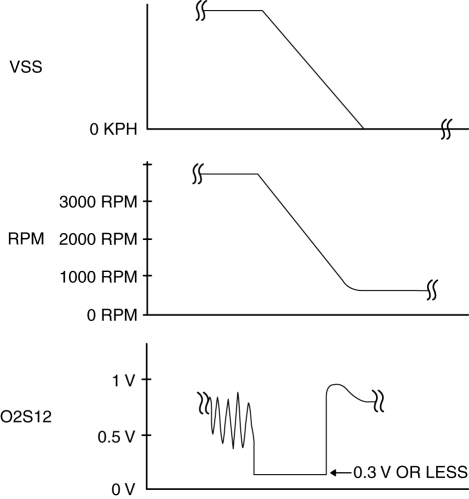
5. Drive the vehicle and decelerate the engine speed by releasing the accelerator pedal fully when the engine speed is 3,000 rpm or more
.
6. Verify that the HO2S output voltage (PID: O2S12) is 0.3 V or less
while decelerating as shown in the figure.
-
If not as specified, replace the HO2S..
HO2S Heater Inspection
WARNING:
-
A hot engine and exhaust system can cause severe burns. Turn off the engine and wait until they are cool before removing the exhaust system.
1. Disconnect the negative battery cable..
2. Lift up the vehicle.
3. Remove the floor under cover. (vehicles with floor under cover).
4. Disconnect the HO2S connector.
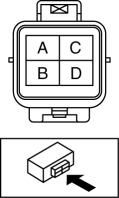
5. Measure the resistance between HO2S terminals C and D.
-
If not as specified, replace the HO2S..
-
HO2S heater resistance
-
2—50 ohms [normal temperature]
 Heated Oxygen Sensor (HO2 S) Heater Control
Outline
Based on the control of the HO2S heater, a stabilized oxygen concentration
is detected even at low exhaust temperatures, and feedback control of fuel injection
even at cold engine ...
 Heated Oxygen Sensor (HO2 S) Removal/Installation
WARNING:
A hot engine and exhaust system can cause severe burns. Turn off the engine
and wait until they are cool before removing the exhaust system.
CAUTION:
Do not allow fla ...
Other materials:
Washer Motor Removal/Installation
1. Disconnect the negative battery cable..
2. Set the front over fender aside..
3. Set the mudguard (RH) aside..
4. Remove the front bumper..
5. Disconnect the washer motor connector from the washer motor.
6. Disconnect the windshield washer hose from the washer motor.
7. Disconnect the ...
Lights On Reminder Warning Alarm
Purpose
The lights-on reminder warning alarm notifies the driver that the TNS and
headlights are not turned off.
Function
The instrument cluster receives the following vehicle condition signals via
the CAN signal from the start stop unit and rear body control module (RBCM). ...
Neutral Switch Removal/Installation [C66 M R]
1. Disconnect the negative battery cable..
2. Remove the air cleaner component. (ex: air cleaner, air hose).
3. Remove in the order indicated in the table.
4. Install in the reverse order of removal.
1
Neutral switch connector
2
Neutral ...
