
Mazda CX-5 Service & Repair Manual: Front Frame (Rear) Removal [Panel Replacement]
Symbol Mark

Removal Procedure
1. Drill the 33 locations shown in the figure.
NOTE:
-
When drilling, do not drill a hole all the way through or there could be a problem when installing the new part.
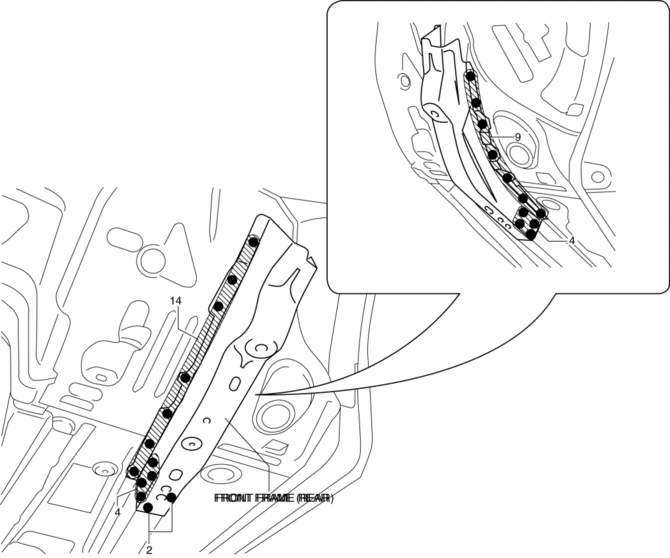
2. Remove the front frame (rear).
 Front Frame (Rear) Installation [Panel Replacement]
Symbol Mark
Installation Procedure
1. When installing new parts, measure and adjust the body as necessary to conform
with standard dimensions.
2. Drill holes for the plug welding before inst ...
 Front Pillar Installation [Panel Replacement]
Symbol Mark
Installation Procedure
1. When installing new parts, measure and adjust the body as necessary to conform
with standard dimensions.
2. Drill holes for the plug welding before inst ...
Other materials:
Blind Spot Monitoring (BSM) System
Blind Spot Monitoring (BSM) System
The Blind Spot Monitoring (BSM) system is designed to assist the driver by monitoring
blind spots on both sides of the vehicle to the rear in certain situations such
as when changing lanes on roads and freeways.
The BSM system monitors the detection areas on ...
Throttle Position (TP) Sensor
Purpose/Function
Detects the throttle valve opening/closing condition, which operates in accordance
with the accelerator pedal operation, as basic information for mainly determining
the fuel injection amount.
Detects the throttle valve opening/closing condition, which operates i ...
Air Cleaner Element Inspection
1. Remove the air cleaner element..
2. Inspect the following items:
Has the replacement interval past?
Is the air cleaner element soiled, damaged, or bent?
Are the air cleaner case and the air cleaner element correctly sealed?
Is the correct air cleaner element inst ...
